
离线 · 无上传 · 浏览器本地完成Offline · no uploads · runs in the browser
CSV 转换:全部可用目标CSV conversions: every available target
CSV 看起来只是一堆逗号,真正麻烦的是解析前的类型判断:`1/2` 是日期还是分数,`00123` 是邮编还是数字。这条管线先按 `raw` 读入,再把明确是数字的字段恢复成数字,其余保持原字符——这是它能被信任的原因,也是它不会替你做更多猜测的原因。A CSV looks like commas, but the hard part happens before parsing: is `1/2` a date or a fraction, is `00123` a postcode or a number? This pipeline reads raw first and only restores fields that are unambiguously numeric, leaving everything else as the characters it found. That is why it can be trusted, and why it will not guess further than that.
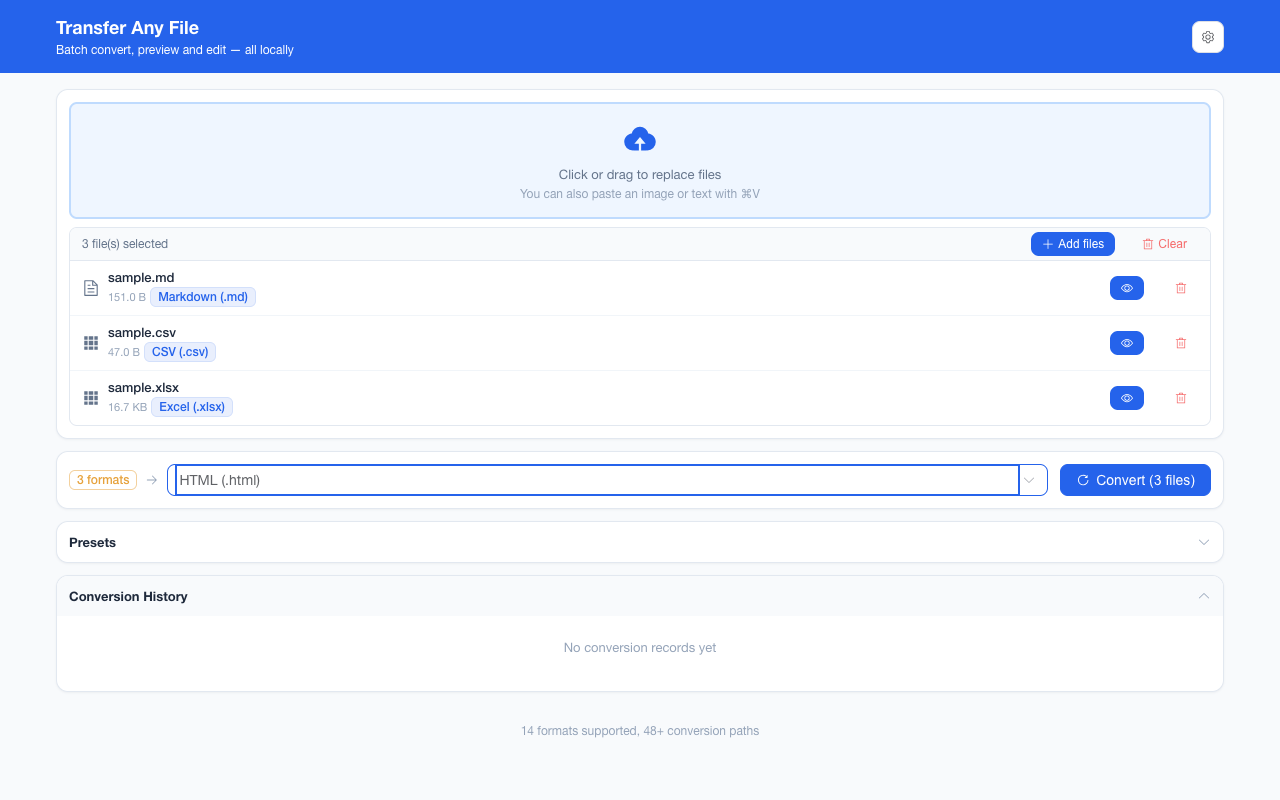
全部可用目标Every available target
-
MarkdownMarkdown 2 步2 steps
CSVCSV HTMLHTML MarkdownMarkdown
把 .csv 变成 GitHub 风格的管道表:引号里的逗号与字段内换行按 CSV 语法解析成一个单元格,格子里的竖线自动转义。批量、可预览、零网络请求。A CSV becomes a pipe table: quoted commas and newlines inside a field parse as one cell, and a pipe in a cell is escaped. Batch, offline, no requests.
-
HTMLHTML 1 步1 step
CSVCSV HTMLHTML
在浏览器里把 .csv 变成一张真的 HTML 表格:带引号的逗号与字段内换行按一个单元格处理,值原样呈现。批量、可预览、零网络请求。A real HTML table from your .csv: quoted commas and newlines inside a field stay one cell, and values print as written. Batch, previewable, zero requests.
-
Word (.docx)Word (.docx) 2 步2 steps
CSVCSV HTMLHTML Word (.docx)Word (.docx)
CSV 先按 `raw: true` 读成一张 HTML 表,再打包成 Word 文档:`00424`、`2024-01-05` 保持写下的字符,排版由 Word 决定。全程离线。The CSV is read with raw: true into an HTML table, then packed as a Word file whose layout Word itself decides: 00424 and 2024-01-05 stay as written. Offline.
-
PDFPDF 2 步2 steps
CSVCSV HTMLHTML PDFPDF
在浏览器里把 .csv 排成 PDF 表格:先解析成 HTML 表格,再按 A4 切成多页。数字与日期按单元格原样呈现,全程不上传。Turn a .csv into a PDF in your browser: parsed into an HTML table, then sliced into A4 pages. A rendered image, with no text layer and no upload.
-
Excel (.xlsx)Excel (.xlsx) 1 步1 step
CSVCSV Excel (.xlsx)Excel (.xlsx)
浏览器本地把 .csv 转成 .xlsx:只有能精确回写的字段才当数字存,长编号与前导零原样保留;GBK/GB18030 编码自动兜底。Convert .csv to .xlsx in your browser: only fields that round-trip exactly become numbers, so long IDs and leading zeros survive. GBK / GB18030 decodes itself.
-
纯文本 (TXT)plain text (TXT) 2 步2 steps
CSVCSV HTMLHTML 纯文本 (TXT)plain text (TXT)
把 CSV 变成制表符分隔的纯文本:一行一条记录、值原样保留,贴进聊天记录或纯文本编辑器都不散列。全程离线,不经过服务器。A CSV becomes tab-separated plain text: one record per line, values as written, so it pastes into chat or a text editor without breaking columns.
-
JSONJSON 1 步1 step
CSVCSV JSONJSON
浏览器本地把 .csv 转成 JSON 行对象:字段先按原文读入,只在「解析→回写完全一致」时才恢复数字类型;GBK / GB18030 自动兜底。Convert .csv to JSON row objects locally: every field starts as text and regains a numeric type only when parse-then-reprint reproduces it exactly.
-
PNGPNG 2 步2 steps
CSVCSV HTMLHTML PNGPNG
CSV 先按 `raw: true` 读成 HTML 表,再整页无损截成一张 PNG:1px 边框与行条纹由自带样式表决定。高度超过 32768 px 会报错而不是截断。Read with raw: true into HTML, then captured losslessly as one PNG: 1px rules and row striping come from the bundled stylesheet. Past 32768 px it fails.
-
JPEGJPEG 3 步3 steps
CSVCSV HTMLHTML PDFPDF JPEGJPEG
表格先写成无损的 A4 PDF 页面,再逐页编码成 JPEG:质量与目标体积在这里有档位,长表会跨页并打包成 ZIP。全程离线。The table becomes lossless A4 PDF pages, then one JPEG per page: quality and target size have dials here, and long tables arrive in a ZIP. Offline.
-
WebPWebP 3 步3 steps
CSVCSV HTMLHTML PDFPDF WebPWebP
三步:表格出 HTML、按 A4 渲染成无损 PNG 切片写进 PDF,再逐页画到白底编码成 WebP。只有终点量化一次。全程离线。Three steps: the table becomes HTML, is laid out on A4 into lossless PNG slices inside a PDF, then drawn page by page onto white and encoded as WebP.
这个来源格式的共同限制What holds for every target from this source
- 编码按 BOM、NUL 与 UTF-8 → GB18030 → GBK 的严格顺序判定;四种都不成立时报解码失败,不产出乱码Encoding is decided by BOM, NUL and the strict UTF-8 → GB18030 → GBK chain; if none holds, the route reports a decode failure rather than writing mojibake
- CSV 没有标题层级、合并单元格或样式;表格之外的东西本来就不存在A CSV has no heading hierarchy, merged cells or styling; anything outside the grid never existed
- 一列里混用日期与数字时按字段各自判断,不做整列强制转换A column mixing dates and numbers is judged field by field rather than coerced as a whole
- 一个 CSV 文件只对应一张表;多文件批次按文件各出一份结果One CSV file is one table; a multi-file batch produces one result per file
常见问题Questions people actually ask
`00123` 会被当成数字 123 吗?Will `00123` become the number 123?
只有整列都表现为数值时才会恢复成数字;带前导零的账号、邮编会保持原字符。日期同理:先确认它是工作簿能识别的日期,才规范化,避免把 `1/2` 猜成某一天。A field is restored to a number only when it is unambiguously numeric; an account or postcode with a leading zero keeps its characters. Dates work the same way: the reader normalises one only after recognising it as a date, so `1/2` is not guessed into a particular day.
CSV 转 PDF 后表格能编辑吗?Is the table in a CSV to PDF result editable?
不能。PDF 路线把表格渲染成 A4 页面图像,文字不可选中。需要保留数据请选 Excel 或 JSON;需要可编辑文档请选 Word。No. The PDF route renders the table into A4 page images, so the text is not selectable. Choose Excel or JSON to keep the data, or Word for an editable document.
多张表能一起转吗?Can several tables be converted together?
把多个 CSV 放进同一批次,整批共用一个目标格式,每个文件各出一份结果;需要一次拿走时用 ZIP。一个 CSV 内部不会被拆成多张表。Put several CSV files in one batch: they share a target and each produces its own result, with a ZIP when you want them in one download. A single CSV is never split into several tables.
GBK 编码的 CSV 能读吗?Can a GBK-encoded CSV be read?
能。先看 BOM 与 NUL,再依次尝试严格 UTF-8、GB18030、GBK;解出的文字还要通过控制字符闸门。若全部失败,会明确报解码失败,而不是产出一份乱码。Yes. The reader checks BOM and NUL, then tries strict UTF-8, GB18030 and GBK, with a control-character gate on the result. If all fail it reports a decode failure rather than writing mojibake.
不需要账号,也不需要联网:装好扩展后点图标,在新标签页里打开工作台,文件从磁盘直接选。No account and no network: install the extension, click its icon, and the workbench opens in a new tab reading straight off your disk.
从 Chrome 应用商店安装Install from the Chrome Web Store 安装步骤Install steps GitHub 源码Source on GitHub
最后更新 2026-10-21Last updated: 2026-10-21