
离线 · 无上传 · 浏览器本地完成Offline · no uploads · runs in the browser
CSV 转 PDF(.pdf)——表格铺成 A4,本地完成CSV to PDF (.pdf) offline — your table on A4 pages
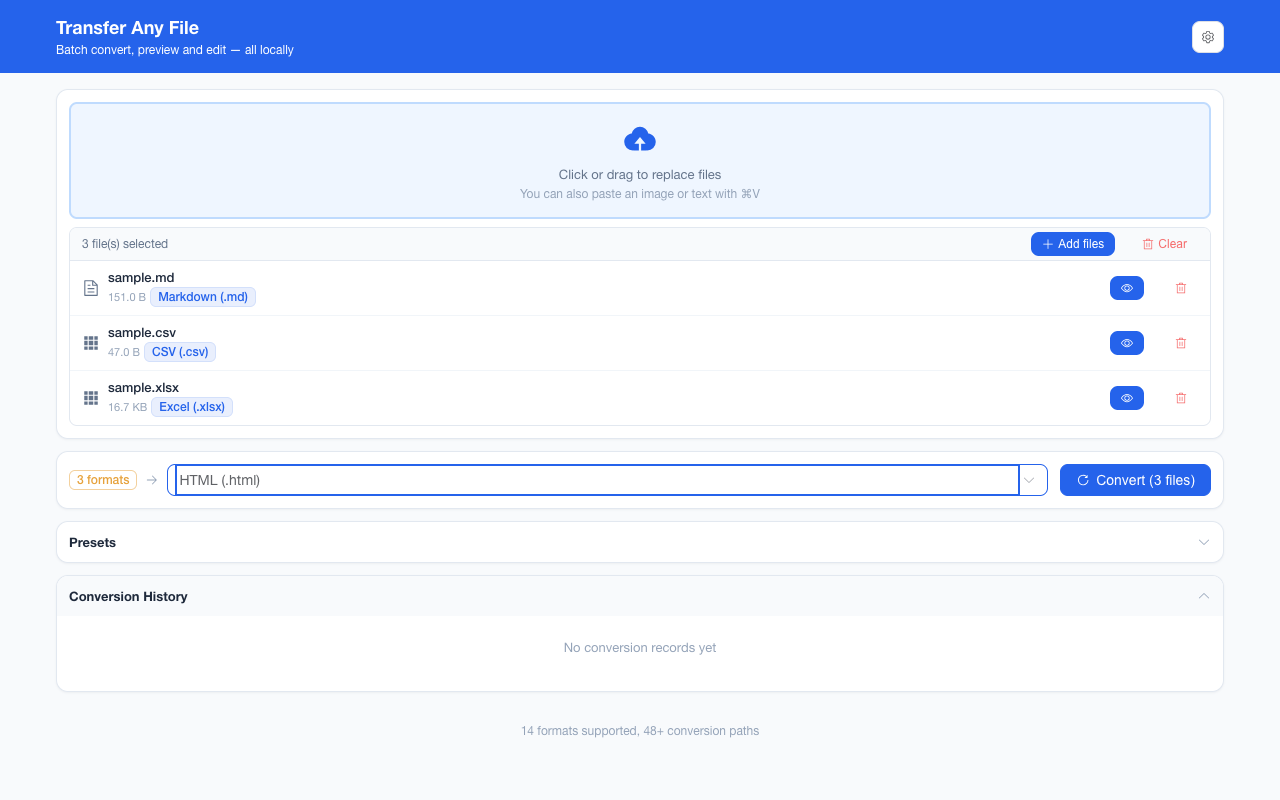
导出的 CSV 往往是「给人看的表」,而收的人只想要一个能直接打印、排版不会跑的文件。这条链路是 CSV → HTML → PDF:先用 SheetJS 把每一行读成表格,再把整张表格渲染成 A4 并切成若干页。它解决的是分发环节的问题——不是把 CSV 变成可再编辑的数据(那一步是 CSV 转 Excel),而是让它长得像一份正式表格。全程在标签页里完成,没有服务器、没有排队。A CSV you exported is a table for the eye, but the person you send it to often wants something printable whose layout will not move. This route is CSV → HTML → PDF: SheetJS reads each row into a table, the table is rendered, and the result is cut into A4 pages. It answers the delivery problem, not the re-editing one (that is CSV to Excel) — and every step happens in the tab, with no server and no queue.
这条链路怎么走How the route runs
CSVCSV HTMLHTML PDFPDF
共 2 步,由扩展的路径搜索自动选出,中间产物不落盘。2 steps, chosen by the extension's own path search; intermediate results never touch the disk.
会保留什么What carries over
- 每一行都写成表格里的一行,第一行也在内——不像 CSV 转 JSON 会拿首行当键名;列序与文件里一致Every row becomes a table row, the first one included — unlike CSV to JSON, which spends row one on key names; columns stay in file order
- 按原文读取:单元格里那串字符就是最终呈现,不会被类型推断改写成 `1/5/24` 或一串序列号The file’s own characters are what gets printed: the CSV is read raw, so type inference cannot rewrite values into `1/5/24` or a serial number
- 编码不是前提:输入按 UTF-8 → GB18030 → GBK 依次尝试解码,老编辑器导出的 GBK 文件也读得进来The encoding is not a precondition: input is decoded UTF-8 → GB18030 → GBK, so a GBK file saved by an older editor still reads
- 整张表先在 800 px 宽的版面上排好,再按 A4 的宽高比切成若干页,长表往下翻页而不是被裁掉The table is laid out once on an 800 px surface, then cut into pages at the A4 aspect ratio, so a long table continues onto the next page
如实说明的限制What it does not do
- 产出的 PDF 是渲染出来的图像,没有文字层:文字不能选中、搜索不到,也过不了 OCR 之外的提取工具The PDF is a rendered image with no text layer: text cannot be selected or searched, and extraction tools will not find it either
- 样式不跟过来——字体、列宽、单元格颜色由渲染时的默认版式决定,CSV 里也没有这些信息可给Styling does not follow — fonts, column widths and cell colours come from the default layout at render time, and a .csv has none to give
- 版面宽度固定在 800 px,不随列数变宽:比这更宽的表,靠右侧的那几列进不了画面,列多时先转 ExcelThe surface stays 800 px wide no matter how many columns there are: the right-hand columns of a wider table never reach the picture, so take Excel for that case
- 分页按固定高度切,不保证把一行整个留在同一页——跨页的那一行会上下各留一半Pages are cut at a fixed height, so a row can straddle the break and end up split between two pages
- 四字节 emoji 与生僻字取决于系统字体是否装了那一枚字形;缺字形时渲染成方框是浏览器的行为,不是转换出错Emoji and rare glyphs depend on whether a font covering that code point is installed; a tofu box is the browser’s doing, not a conversion error
实操提示Working with it
- 一批最多 200 个文件,单个文件上限 100 MB;多个 .csv 一起转会逐个产出各自的 .pdf,想一次拿走就打成一个 ZIPUp to 200 files per batch and 100 MB per file; several .csv files yield one .pdf each, and the whole set can be taken as a single ZIP
- 文件多于五个或总量超过 20 MB 时,只要偏好里的大批次确认还开着(默认开着),工作台会先要一次确认Batches over five files or 20 MB ask for one confirmation first, as long as the large-batch confirmation is still on in preferences — it is by default
常见问题Questions people actually ask
转出来的 PDF 能选中文字吗?Can I select the text in the resulting PDF?
不能。这条链路把表格渲染成图像再铺到 A4 页上,所以没有文字层——这是它能锁住版式的代价。要一份能选中、可搜索的 PDF,目前这条路给不了;要的是能再编辑的数据,走 CSV 转 Excel。No. The route renders the table to an image and lays that on A4 pages, so there is no text layer — the price of pinning the layout. If you need selectable, searchable text this route cannot give it; if you need data you can keep editing, take the CSV to Excel route.
逗号在字段里、带引号的多行单元格,能正确切开吗?Do quoted commas and multi-line cells parse correctly?
能。分隔与引号交给 SheetJS 的 CSV 解析,不靠字符串按逗号 split,所以带引号的逗号、字段内换行都按一个单元格处理。解码那一步另有闸门:四种编码都读不出文本时宁可报错,也不会交出一份乱码。Yes. Splitting is SheetJS’s CSV parser, not a string split on commas, so quoted commas and a newline inside a field stay one cell. The decoding step has its own gate: if none of the encodings yields text, it errors instead of handing you mojibake.
表格是客户名单,文件会离开本机吗?If the table is a customer list, does the file leave my machine?
不会。扩展只申请 storage 权限、没有 host 权限,产物里也没有从网络取来的代码;读文件、解析、渲染、写 PDF 全在标签页内完成。No. The extension asks for the storage permission only, has no host permissions and ships no remotely hosted code; reading, parsing, rendering and writing the PDF all happen inside the tab.
不需要账号,也不需要联网:装好扩展后点图标,在新标签页里打开工作台,文件从磁盘直接选。No account and no network: install the extension, click its icon, and the workbench opens in a new tab reading straight off your disk.
从 Chrome 应用商店安装Install from the Chrome Web Store 安装步骤Install steps GitHub 源码Source on GitHub