
离线 · 无上传 · 浏览器本地完成Offline · no uploads · runs in the browser
PDF 转 WebP——本地逐页出图,通常比 JPEG 更小PDF to WebP locally — one page per image, vs. JPEG
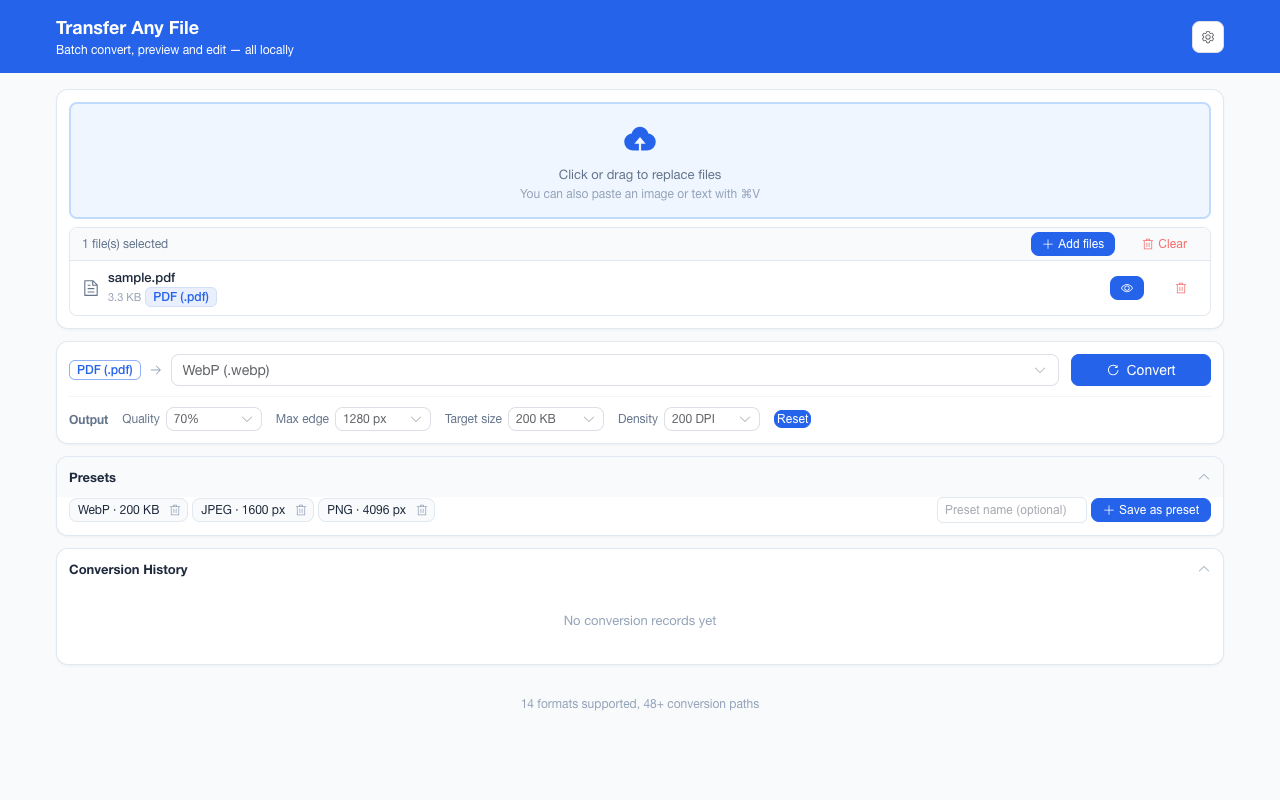
和 PDF → JPEG 同一条渲染、同一个直接边,最后一步换成 WebP 编码。选它的理由只有一个:同一页往往更小(幅度取决于页面内容,这一页不替你写百分比),前提是接收方读得开 WebP。别把 Alpha 通道算成理由——WebP 支持透明,但这条转换在渲染前给每页铺白底,通道里没有内容可装;真要透明请在图片之间转,PNG 转 WebP 那一条是真的带 Alpha 的。Same render and same direct edge as PDF to JPEG, with a WebP encode at the end. There is one reason to pick it: the same page is often smaller (the margin belongs to the content, and this page will not quote you a percentage), provided the recipient opens WebP at all. Alpha is not that reason — WebP can carry transparency, but this converter paints every page white before rendering, so the channel has nothing to hold. Where transparency is the requirement, convert between images instead: PNG to WebP really does carry it.
这条链路怎么走How the route runs
PDFPDF WebPWebP
共 1 步,由扩展的路径搜索自动选出,中间产物不落盘。1 step, chosen by the extension's own path search; intermediate results never touch the disk.
会保留什么What carries over
- 每页独立成图、按 PDF 页码命名(`page-3.webp` 就是第 3 页)One image per page, named by document page number — `page-3.webp` is page 3
- 渲染密度四档 96 / 144 / 200 / 300 DPI,默认 144;页面按矢量渲染路径栅格化A chosen density of 96, 144, 200 or 300 DPI, 144 by default, rasterised along the vector render path
- 质量档 40%–90% 与目标体积只在末尾这次编码生效,中间步骤不吃Quality steps of 40%–90% and a target size act only at the final encode; intermediate steps ignore both
- WebP 有质量档与目标体积两根杠杆,是有损容器;它比 JPEG 多出来的 Alpha 能力在这条路上用不上——渲染前已经铺了白底WebP brings two levers, a quality step and a target size, and is a lossy container; the alpha it has and JPEG does not is unusable on this route, because the page is already painted white
- 超过 8192 px 一边的页面自动缩到画布可承受的范围,不裁切Pages past 8192 px on an edge scale down to what the canvas can allocate, rather than clip
如实说明的限制What it does not do
- 产物是像素,文字不可选中、不可复制、不可搜索The output is pixels — text is not selectable, copyable or searchable
- 这一条渲染前每页都铺白底,所以原本透明的页面区域在结果里也是白的;三个图片终点一样处理,从 PDF 拿不到透明输出Every page is painted white before this render, so an area that was transparent reads as white; all three image targets are handled the same way and none of them yields transparency out of a PDF
- 接收方能不能打开 WebP 由它决定:邮件客户端与部分旧版办公套件仍不友好,这时 JPEG 或 PNG 更稳Whether WebP opens is the recipient’s call: mail clients and some older office suites are still unfriendly, where JPEG or PNG is the safer answer
- 有损编码,细线与极小字号会先糊;要"无损存档"就选 PNGA lossy encode gives up hairlines and very small type first; choose PNG when the point is a lossless archive
- 表单控件、批注、书签与附件不进图像;扫描件仍然提取不出文字(无 OCR)Form fields, annotations, bookmarks and attachments are not rendered out, and a scan still yields no extractable text (no OCR)
实操提示Working with it
- 与 PDF → PNG / JPEG 共享同一套输出参数面板:最长边、质量、目标体积、渲染密度、页面范围PDF to PNG and PDF to JPEG share this panel: longest edge, quality, target size, render density and page range
- 单页 PDF 直接给一张 .webp,两页以上打包成 ZIPA single-page PDF returns one .webp; two or more pages arrive inside a ZIP
- 一批最多 200 个文件、单个文件 100 MB 上限,中途可取消且取消会被如实标出Up to 200 files per batch with a 100 MB per-file ceiling, cancellable at any point and reported truthfully as interrupted
常见问题Questions people actually ask
WebP 一定比 JPEG 小吗?Is WebP always smaller than JPEG?
不保证。文字密排的页面往往省得多,照片型页面省得少,幅度是内容的属性而不是格式的常数。这条页不写具体百分比,因为那是可以实测的东西,不该靠印象。Not guaranteed. Text-heavy pages tend to gain most, photographic pages least, and the margin is a property of the content rather than a constant of the format. This page quotes no percentage it has not measured.
三种图片格式之间我该选哪个?Which of the three image formats should I pick?
要无损存档:PNG。要"到处都打得开":JPEG。要在两者之间取体积、并且接收方确定支持 WebP:WebP。这三条判断只关乎容器与编码,透明不在其列——这一路的三个终点都先铺白底,谁都不带透明。PDF 那边输入完全一样,所以混着试同一份文档的成本很低。PNG for a lossless archive. JPEG where "must open anywhere" is the requirement. WebP to buy size between the two, provided the recipient is known to read it. Those three calls are about container and encoder, and transparency is not among them — all three targets are painted white first. The PDF input side is identical, so trying all three against one document is cheap.
能只转其中几页吗?Can I render only some of the pages?
能,填页面范围(例如 1,3-5)。这一路是唯一支持页码筛选的转换,因为"一百页全栅格化"正是它最重的用法;范围里一页都落不上时会直接报错,而不是退回全量。Yes — give it a page range such as 1,3-5. This is the only route in the extension that filters by page number, precisely because rasterising a hundred pages is its worst case. A range that lands on no page fails rather than falling back to the whole document.
不需要账号,也不需要联网:装好扩展后点图标,在新标签页里打开工作台,文件从磁盘直接选。No account and no network: install the extension, click its icon, and the workbench opens in a new tab reading straight off your disk.
从 Chrome 应用商店安装Install from the Chrome Web Store 安装步骤Install steps GitHub 源码Source on GitHub
要把它压到指定体积?Need it under a target size? The 图片压缩工具image compressor可以在浏览器里重编码 PNG / JPEG / WebP。 re-encodes PNG / JPEG / WebP in the browser.