Move Passwords Out of Bitwarden or 1Password
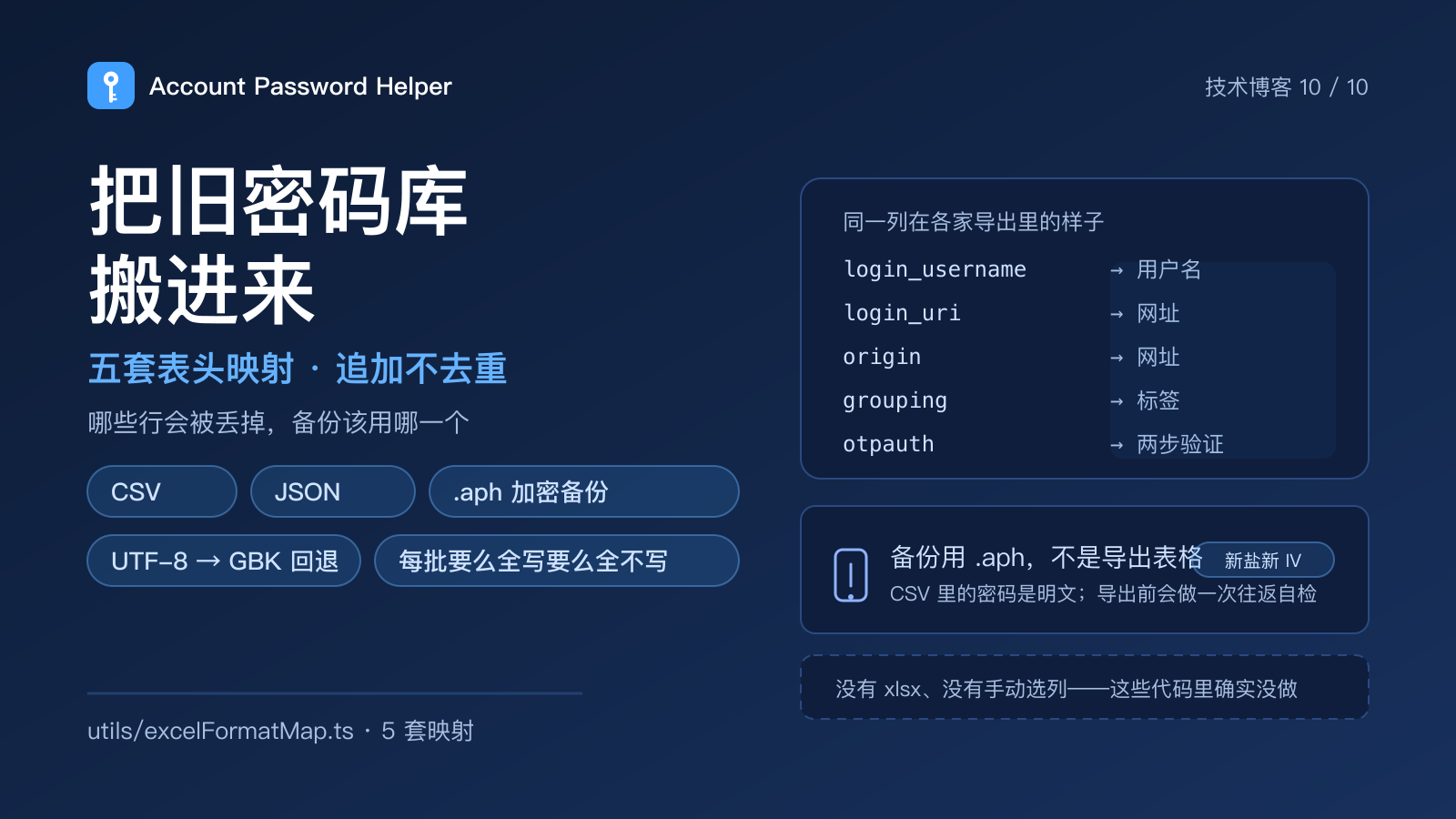
Migration is where a new password manager loses people. The tool can be good and still fail here, because nobody wants to import an old vault they can't verify. Most migration guides say "click import" and skip everything that actually goes wrong: which columns were recognised, which rows quietly disappeared, what happens to duplicates, and whether it's safe to delete the old vault afterwards.
Here is what the code really does. Three findings up front, because they're the counter-intuitive ones:
- Import appends. It never de-duplicates. That's a deliberate choice, not an oversight.
- Header recognition is driven by five column maps covering this extension's own format plus four common exports. A column it can't map becomes an empty field — it doesn't error.
- The real backup is not the spreadsheet. It's the
.aphfile, because an exported CSV holds plaintext passwords.
1. What each tool actually exports
Nearly every manager can export CSV, but the column names barely resemble each other: one writes URL, another origin, a third login_uri. So compatibility isn't "supporting a product", it's "supporting a header shape".
There are six internal fields — username, password, URL, tags, notes, TOTP — mapped from five header sets (utils/excelFormatMap.ts):
| Map | Username | Password | URL | Tags | Notes | TOTP |
|---|---|---|---|---|---|---|
| Native | 用户名(必填) / 用户名 / 账号 / username |
密码 / password |
网址 / URL / 网站地址 / 链接 |
标签 / 分类 |
备注 / 说明 |
两步验证 / 密钥 |
| Browser built-in | username |
password |
url / origin |
name |
note |
otpauth / otp_auth |
| LastPass | username |
password |
url |
grouping |
extra |
totp |
| Bitwarden | login_username |
login_password |
login_uri |
folder |
notes |
login_totp |
| 1Password | Username |
Password |
Url |
Title |
Notes |
OTPAuth / totp |
Recognition order matters: headers are matched exactly first, then a case-insensitive pass; every cell is trimmed. Auto-detection looks at shape (a origin column means the browser export) and defaults to that map. If the first pass yields nothing usable, it retries against the remaining formats rather than giving up.
One detail that matters a lot for Chinese users: the file is decoded as UTF-8, and if that pass yields nothing parseable it retries once as GBK. To be precise about the trigger — it's "nothing came out", not "decoding threw": the UTF-8 path uses non-fatal decoding and doesn't raise. Plenty of tools exported by Chinese services emit GBK CSVs; skip that fallback and every account name arrives as mojibake.
2. Which rows disappear silently
This is where "it lost my data" reports come from. The rules are explicit, just rarely read:
- An empty username cell drops the whole row. That's the most common silent loss: an entry with no identifier isn't a credential, it's unsearchable noise.
- A row that parses into fewer than two cells is skipped. Note it counts columns, not non-empty values — so a line carrying a single field (a bare URL, say) is stopped here.
- Unrecognised columns become empty values; the rest of the row survives, and nothing errors.
- A header-only file produces an empty list and the dialog says so — it doesn't pretend to have imported something.
One honest gap: there is no manual column-mapping UI. If your tool emits an obscure header set, the fix is to rename the header, not to wait for a feature. Make the first row read 用户名,密码,网址,标签,备注,两步验证 and the native map catches it — that's exactly what "download template" gives you.
3. Why import never de-duplicates
[...existing, ...imported], each row with a freshly generated id, appended at the end. Looks unsophisticated. Three reasons it's the right default:
- De-duplication has no safe threshold. Matching on URL treats
dev.example.comandexample.comas one site — and multi-environment accounts are precisely what this tool is for. Merging two environments into one entry is far worse than having a duplicate. - De-duplication is a separate, reviewable action: "one-click de-duplicate" groups by username + URL, and the confirmation step first reports how many groups and how many entries are involved before you decide. Rewriting data at the moment of import is not reversible.
- The failure mode of import should be redundancy, not loss. Duplicates cost one more click. Silently merged fields don't come back.
So: import once, spot-check a few entries, then clean up if you actually need to. Don't try to prevent duplicates before you've seen them.
4. Three gates: bytes, entries, capacity
| Gate | Limit | What it stops |
|---|---|---|
| File size | 32 MiB | someone feeding an entire backup into the CSV importer; malformed blobs |
| Parsed entries | 10,000 | an explosion of rows before encryption and storage |
| Vault capacity | 2,000 | the whole vault failing to persist afterwards |
The byte gate deliberately runs before the file contents are read, so an oversized file never costs a full read. The capacity gate is the one you'll meet in practice: with 1,950 entries and a 200-entry import, it slices to the remaining space and asks for confirmation — and if you cancel, nothing is written. Writes are batch-atomic: all of it or none of it, never "37 mystery rows appeared".
5. What survives the move, and what doesn't
| Data | CSV | JSON | .aph backup |
|---|---|---|---|
| Username / password / URL | yes | yes | yes |
| Tags | yes | yes | yes |
| Notes | yes | yes | yes |
| TOTP secret | yes | yes | yes |
| Favourite flag | no (no such column) | only if boolean | yes |
| Original created / updated | no — stamped with import time | yes | yes |
| Password history snapshots | no | no | no |
| Trash entries | no | no | no |
Two traps here. CSV carries no favourite flag, so anyone treating a CSV as their backup loses every favourite on the move. And CSV rewrites timestamps — while "not updated in a long time" is one of the four scored dimensions of the security audit. Run the audit after a CSV migration and that dimension has been reset by the import itself: a clean score you didn't earn.
Password history never travels, deliberately. Snapshots are local operational data, not credentials.
6. The backup that actually works
Exporting CSV requires the master password, but the result is plaintext. It exists to feed other tools, not to sit in a folder. Encrypted backup is a different path:
- the container (version, export timestamp, entry count, entry data) is serialised and encrypted in one pass with AES-256-GCM, keyed by PBKDF2-SHA256 at 600,000 iterations; the bytes on disk are
salt ‖ iv ‖ ciphertext; - don't conflate this with how the vault itself is stored: per-field encryption is the shape of
chrome.storage.local, whole-container encryption is the shape of a backup file. Both are true, they're just different layers; - each export draws a fresh salt and IV, so the same vault exported twice yields different bytes;
- before the download starts it does a round-trip check: decrypt what it just produced, compare counts and fields, and refuse to hand you a file that fails. The reasoning is simple — the worst kind of backup is the one you believe you have.
Restoring an .aph asks for the master password you used at export time, not your current session password. If you've since changed it, an old backup won't open with the new one. That's expected, not a bug.
Don't confuse the siblings. .aphid is the personal-info vault's encrypted backup, and it keeps ids and merges by id (new ids appended, newer updateTime wins, the rest skipped) — the opposite policy to password import, because on that side the identity really is meaningful. .aphrecovery is the offline recovery kit; it contains no vault, it answers "what do I do after forgetting the master password".
7. Site rules need moving too
Per-domain fill entries and match scopes aren't inside the password vault, so they export and import separately. 500 rules; the size limit is approximated against character count at 2 MiB, and that gate runs before JSON.parse. Import accepts both the enveloped structure and a bare { domain: rule } object, validates each domain and selector, counts anything invalid or duplicate-after-normalisation as dropped, and merges by normalised domain with the incoming rule winning. The UI has to report added / updated / dropped together — reporting success without the drop count is how you convince someone their migration was complete when it wasn't.
8. Things that do not exist
So you don't read a claim elsewhere that turns out to be aspirational, these were checked in the source and are not implemented:
- no xlsx support (only
.csvand.json; there's no Excel parser); - no manual column picker at import time;
- no de-duplication or account merging during import;
- no password-history import;
- no favourite column in the CSV export.
Each has a workaround, but a workaround isn't a feature and shouldn't be described as one.
When the move is done, do one thing immediately: open the encrypted-backup importer and actually restore the .aph you just made. Confirm it decrypts and the entry count matches. A backup only exists once it has been restored successfully at least once.
Source and discussion: the GitHub repository. It's listed on the Chrome Web Store, completely free, open source under GPL-3.0.
Key files referenced: utils/excelFormatMap.ts (five header maps), utils/excelCsv.ts (exact→case-insensitive match, row skipping, UTF-8/GBK fallback), utils/excelJson.ts, utils/excelExport.ts (export columns and plaintext passwords), components/options/ImportDialog.vue (byte gate and format detection), composables/useImportCapacity.ts (slicing and confirmation), utils/storage/passwordCrud.ts (batch-atomic writes), utils/backupExport.ts (.aph container, fresh salt and IV, round-trip check), utils/identity/backup.ts (.aphid merge-by-id), utils/siteRulesTransfer.ts (rule migration with added/updated/dropped).