Point a FAT frontend at a UAT backend — one rule,
no code changes
Cross-Origin Proxy is an open-source Chrome extension (Manifest V3) that redirects the API requests a page
makes to another backend environment. Rewrite URLs, headers and responses, mock data with conditional
responses, inject latency, block requests, retry failures and forward WebSocket — configured in the
browser, stored on your machine.
Target environmentUAT · PROD · a mock server — one browser-wide rule set
One rule set, two forwarding channels — chosen per rule, not per project. If interception fails, the
page falls back to native fetch / XMLHttpRequest / WebSocket;
block rules are never replayed.
Page directblocked by CORS policyYour origin is not on the allow list
Extension sends200 OKAny advanced capability answers it
What a CORS cross-origin error costs you
Cross-environment debugging usually costs one of three things: a backend change, a config change in every
project, or a fake local build. This extension collapses all three into a single browser rule that applies
to every page you open.
Before and after, for the common "the UAT service has the fix, my FAT page does not" case
Without the extension
With one rule
Edit the devServer proxy table, then restart the dev server — per project, invisible to teammates.
Add https://fat-api.example.com/* → https://uat-api.example.com. Applies
immediately to every project in the browser.
Ask the backend to add your origin to Access-Control-Allow-Origin and redeploy.
Requests with any advanced capability are answered by the extension, so page CORS checks do not
apply.
Hardcode another environment's token in the source, and remember to revert it.
Inject the header per rule; switch the rule off when you are done.
Wait for an API that is still being built, or stub it inside the application.
Mock it in the rule — optionally a different body per URL, method or query parameter.
Record traffic in a capture tool, then rebuild the request by hand to reproduce a failure.
Import a HAR file or an OpenAPI document, or paste the cURL command, and the rule is prefilled.
Three console messages, blocked at three different points in the same-origin policy
CORS is not one error but a family. Per
MDN's CORS guide, the browser checks in three separate places: the response headers of the actual request, the allow-list
returned to the preflight (OPTIONS), and the stricter mode that applies when credentials are
sent. All three share one prefix,
Access to fetch at '<target URL>' from origin '<your origin>' has been blocked by CORS
                policy
, and the difference lives entirely in the rest of the sentence — searching the whole string usually
returns nothing, while searching the tail returns the rule that is actually failing.
No 'Access-Control-Allow-Origin' header is present on the requested resource.
The backend never echoed fat-web.example.com into
Access-Control-Allow-Origin. Give the rule any advanced capability and the request is
sent by the extension instead, so this check never runs on the page.
Request header field "x-token" is not allowed by Access-Control-Allow-Headers in preflight
                  response.
The preflight was answered too narrowly: you sent something outside the simple-request header set, and
the backend only allows Content-Type. This is a different problem from "the backend isn't
open" — put the custom header in the rule and let the extension inject it, and the page stops sending
OPTIONS altogether.
The value of the 'Access-Control-Allow-Origin' header in the response must not be the wildcard '*'
                  when the request's credentials mode is 'include'.
The strictest case, with cookies attached: Access-Control-Allow-Origin may not be
* — it must be your origin verbatim. This is the usual cause of "everything works on the
same origin, and it 401s the moment I switch environment".
What one proxy rule can change: URL, headers, response, mock
A rule always has a match pattern, a target URL and a priority. Everything else is optional and additive —
and each capability you switch on is also what decides which channel runs it.
Two channels, one rule set
A rule that only rewrites the URL becomes a
declarativeNetRequest
dynamic redirect, resolved by the browser's network stack with no JavaScript per request — for XHR,
navigations, iframes, scripts, styles, images, fonts and media alike. Anything richer runs through the
background service worker: a MAIN-world interceptor patches fetch,
XMLHttpRequest and WebSocket, bridges through an
isolated-world content script, and hands the response back to the page.
Network-layer fast pathMain-world interception30 s per-request ceilingNative fallback
Full control over request and response
Rewrite the URL; inject or replace request headers; replace the request body; override the response
status code, its reason phrase and the response headers; replace individual JSON fields by dot path such
as data.token; or replace the whole body — which takes precedence over the per-field
replacements whenever it is not empty. Header names are validated and CRLF inside values is refused, so
a rule can never smuggle a split request; mocked and overridden status codes are clamped to 200–599 so
the page always gets a response it can construct.
HCBRMDXReWSBadges on every rule row
Wildcard, prefix and regex matching
Three match types — * for any text, a leading substring, or a full regular expression whose
capture groups the target URL can reference. Wildcard and prefix rewrite the same way on both channels;
a regex only does when it covers the whole URL, because the network layer replaces the URL while the
background channel replaces the matched part. On a regex rule the form lines up those capture groups
against the $n references in the target address and flags the ones that disagree — a number
out of range, or above \9, which the network layer cannot read at all (it warns, it never
blocks the save). Regexes are screened for nested-quantifier ReDoS patterns, and anything heading for
the network layer is validated against Chrome's
RE2
engine first.
Mock with conditional responses
Return a crafted JSON / text / HTML / XML body and status without contacting any server — or attach a
list of conditions (URL pattern, method, query parameters) so the first match decides the response. One
rule can stand in for a whole endpoint group, in as many states as you need.
Delay, block and retry
Add 0–60000 ms of latency to exercise skeletons and timeouts; block a request so it fails like a network
error; or let the extension add 1–5 extra attempts after a failure or a 5xx, spaced by an interval you
set between 100 and 30000 ms.
Method filter and query injection
Restrict a rule to GET / POST / PUT / DELETE / PATCH / OPTIONS / HEAD — for example to send only writes
to the test backend — or append and override query parameters such as __env=uat and
gray-release tags on the final URL without rewriting it.
WebSocket forwarding
Point ws:// and wss:// connections at another environment by rewriting the
socket URL, so real-time traffic follows the same switch as REST calls. Patterns may be written with
http(s) or ws(s), and method filtering treats the handshake as
GET. On a socket only the URL rewrite, query parameter injection and blocking take effect;
header, body and response overrides, mock, delay, retry and sending cookies do not apply, and the badge
in the rule list says as much.
A rule workspace, not a config file
Start from a quick template while the list is empty, duplicate a rule, drag to reorder priority, batch
enable, disable or delete, and undo a deletion. Search by name, match pattern or target URL, then narrow
the list with the status and match-type filters. A rule shadowed by a higher-priority rule with the same
pattern is flagged while you edit, so a rule that can never fire does not go unnoticed. A rule that
Chrome's network layer will not apply at all — regex syntax RE2 does not support, or a capture reference
out of range — is tagged "Not applied" in the list. Rules can also carry tags — up to 10 per rule, for
classification and filtering only: a tag takes part in neither matching, channel selection nor any
decision, and it is not in the copy of the rules that reaches the page's own scripts — the bridge strips
it next to the credential fields before handing over — so adding one never changes where a request goes.
The list shows two and folds the rest into +N, the filter is multi-select any-of, and a
"(no tag)" entry picks up the ones nobody has classified yet.
Evidence, not guesswork
The URL match tester previews the matched rule, the rewritten URL, the channel, the extra actions and
which other rules match the same URL but lose to it, for any URL in real time. The request log keeps the
last 500 calls with method, status, duration and the rule that served them, filters by method, status
class, rule name or URL keyword, opens a detail view with the request and response headers and text
bodies (a binary response body is not stored), copies any entry as cURL using its original URL, and
reports hit counts for both channels. In the detail view, headers that carry a session — Authorization,
Cookie and the like — have their values masked by default (long values keep their last 4 characters),
and the reveal switch is taken back as soon as the drawer closes. The detail view also carries a
“Replay” button: it hands that entry's own address, method, headers and body back to the proxy engine
and sends it for real under the rules that apply now — the global switch, the site scope, rule matching,
mock / block / delay / retry and credential expansion all run again (and a replay has no initiating page
host to judge, so under "only sites in the list" it is not sent at all), so the extension never keeps a
second model of what the proxy would do. GET / HEAD / OPTIONS go
straight out and anything else is confirmed first; the outcome is eleven distinct statements rather than
success/failure, and an entry with a truncation marker on any of its recorded fields is never sent. The
“Self-check” card in the popup's action grid (the options page opens it at #self-check too)
gathers the judgements that used to be scattered over four places onto one screen in troubleshooting
order: the global switch, whether this site is in scope, whether the background recorded that this page
never received the last config push, which rule its address matches and over which channel, and whether
the network-layer rules are actually installed — each cell restates a predicate already computed
elsewhere, drawing “unknown” when it cannot read one and “not yet” when that judgement has not landed.
Import, export and environment profiles
JSON config export — share mode is on by default, stripping Authorization, Cookie and similar headers
plus token-like query parameters — with replace or merge modes on import, and a preview before anything
is written that says how many rules the file adds and which same-name, same-pattern rules stay; HAR 1.2
export of captured traffic and HAR import that turns recorded requests into rules (they arrive disabled
unless you set a target environment, which also enables them); an OpenAPI / Swagger document import that
creates one rule per declared servers origin (sources with no readable http(s) address are
skipped and named); cURL paste that prefills the form; copy-as-cURL on every log entry, using its
original URL. Named profiles snapshot the whole rule set, and switching between FAT, UAT and PROD does
not need the options page: the popup lists what you have saved, and one tap on a row plus a confirmation
replaces everything with that set (your current config is kept first as a restore point, and the global
switch turns on). Batch migration rewrites target domains across selected rules with a change preview. A
replace-import, a profile load or a batch delete that actually removed something keeps the rule set it
replaces as a restore point under Settings → Config restore points (the last 5), ready to roll back.
Header and query-parameter values can also be written as a reference such as {{UAT_TOKEN}},
with the real value kept in the credential variable table under Settings → Credential Variables — the
rule itself, the exported config, the profiles and the configuration sent down to the page all carry
nothing but that reference, and the substitution happens at the last moment inside the extension-proxied
request.
The parts you touch every day
The popup holds the global switch, the active-rule count, the request count via the extension
(background channel only), this tab's network-layer hit count for the last 5 minutes, the recent-request
list, quick rule toggles, the auto-off interval picker and its countdown, this page's address match
preview, the “Self-check” card in its action grid and “create a rule for this page” — that last one
first looks at what the page itself has been requesting (fetch/XHR origins read locally from
performance entries, up to six) and offers those API addresses to pick from instead of
copying only the page URL into the rule; when the page reports no such requests, it prefills the page
URL as before. And when a request on the page looks blocked by CORS — a native XHR that no rule covers,
failing as error + status === 0 — its origin is flagged “N suspect” and sorted
first, while the card says “N origin(s) here look blocked by CORS” before you even click. Being blocked
by CORS, being offline, a DNS failure and a refused connection are the same shape to an extension, so
that flag is a clue about what to create first, not a verdict; the numbers are page-reported, kept in
memory and used for nothing but what you see here. Under that data row a line appears when it has
something to say, reading “page-reported”: one sentence showing two of the four counters — how many
requests this page's JS layer intercepted and how many it handed to the extension (a fallback swaps the
second number for how many went native, and with no fallback but a timeout it is how many never got a
response) — while a reading lets hovering expand all four with the moment the report was accepted,
noting that one request can count in more than one of them so they never add up; the counters accumulate
for the current document and reset on navigation. A fallback or a timeout used to leave nothing but a
console line, and “nothing was intercepted” looked exactly like “this page makes no such requests”.
Those four numbers are reported by the page itself and a script on it could forge them, so they stay a
diagnostic clue that feeds no decision, and the wording always says “page-reported”. A toolbar badge
shows the proxy state, and auto-off (30 minutes to 4 hours, on chrome.alarms) closes the
switch so a forgotten proxy never outlives the debugging session.
Interface details that matter
English and Simplified Chinese UI, six colour themes with light / dark / follow-system modes synced
across popup, options and in-page surfaces, and keyboard shortcuts: ⌘⇧P toggle
proxy, N new rule, / focus search,
Esc close. The single-key shortcuts are deliberate — ⌘/Ctrl+N opens a browser
window and a page cannot capture it.
See the interface: rules, URL match tester, request log and config migration
Real screenshots from the current build (demo data only: fat-api.example.com →
uat-api.example.com, no real internal hosts). The options page holds the rule table, match
tester, request logs and import/export; the popup keeps the global switch and the current-page preview one
click away; the credential variable table stores each token exactly once, on this machine.
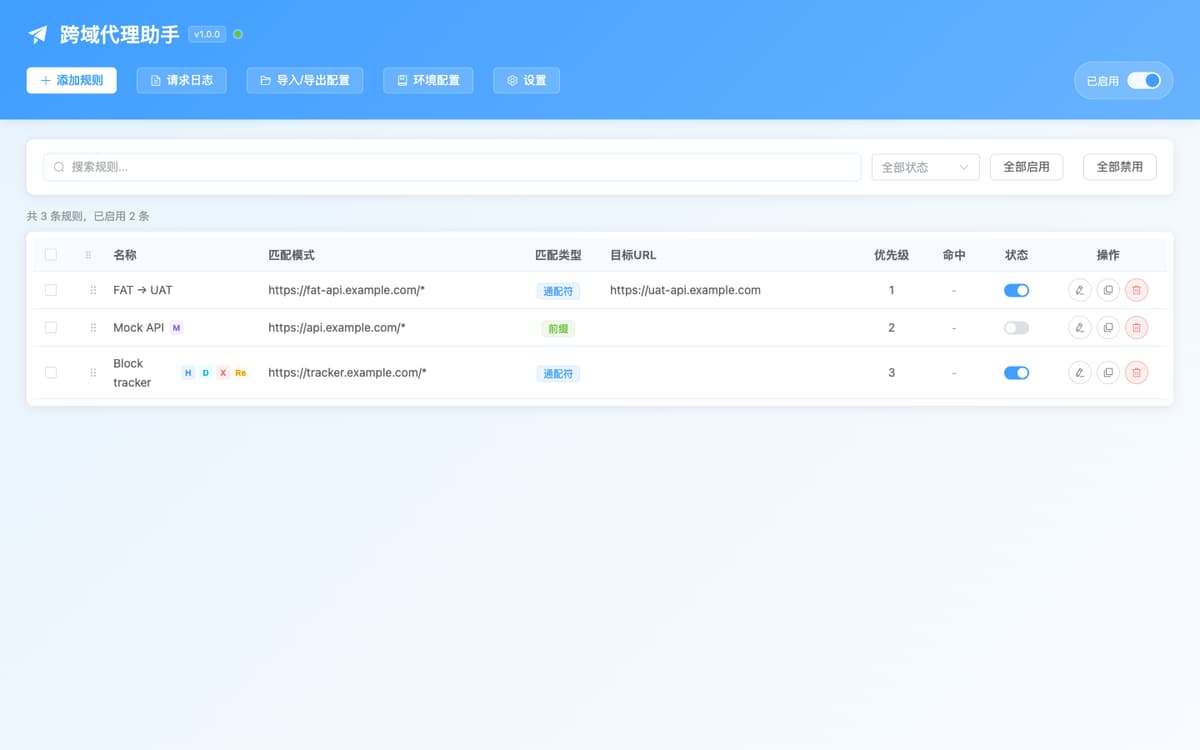
Rule tableWildcard / regex / prefix matching, capability badges (H · C · B · R · M · D · X · WS),
drag-to-reorder priority and inline switches; a filter row with batch enable, and hit counts
tracked as two separate cells (network layer and background).
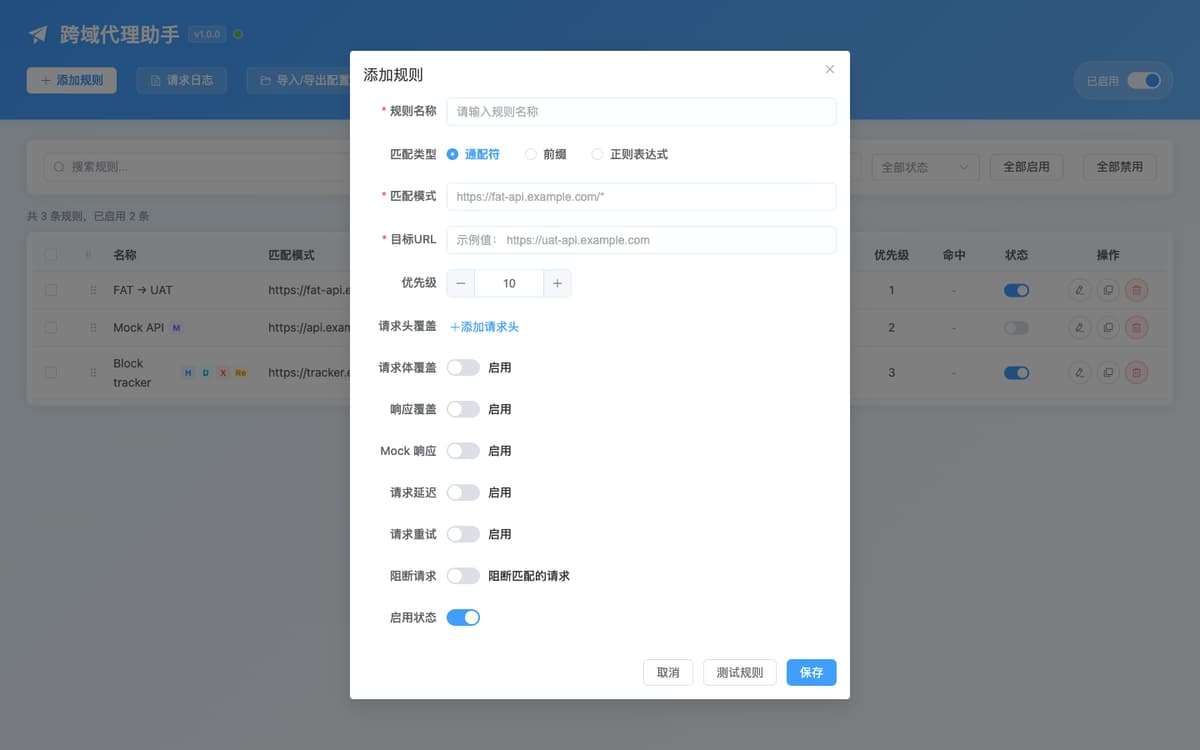
Rule editorOne form for matching, rewriting, method filter, query injection, header and body override and
sending cookies; header values can reference a credential as {{NAME}}. Scrolling down
adds response override, conditional mock, delay, block and retry, with a live conflict
warning.
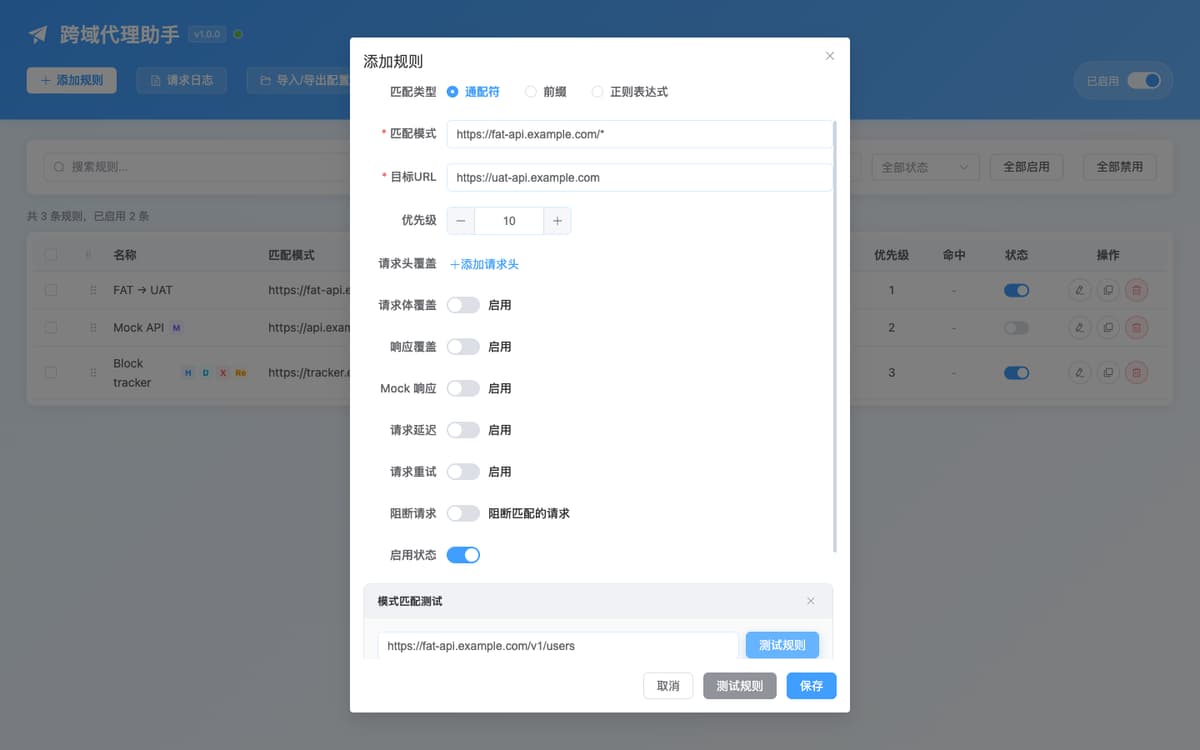
URL match testerType any URL, optionally with a method, to preview the matched rule, the rewritten URL, the
forwarding channel, the extra actions and which other rules match the same URL but lose to
it.
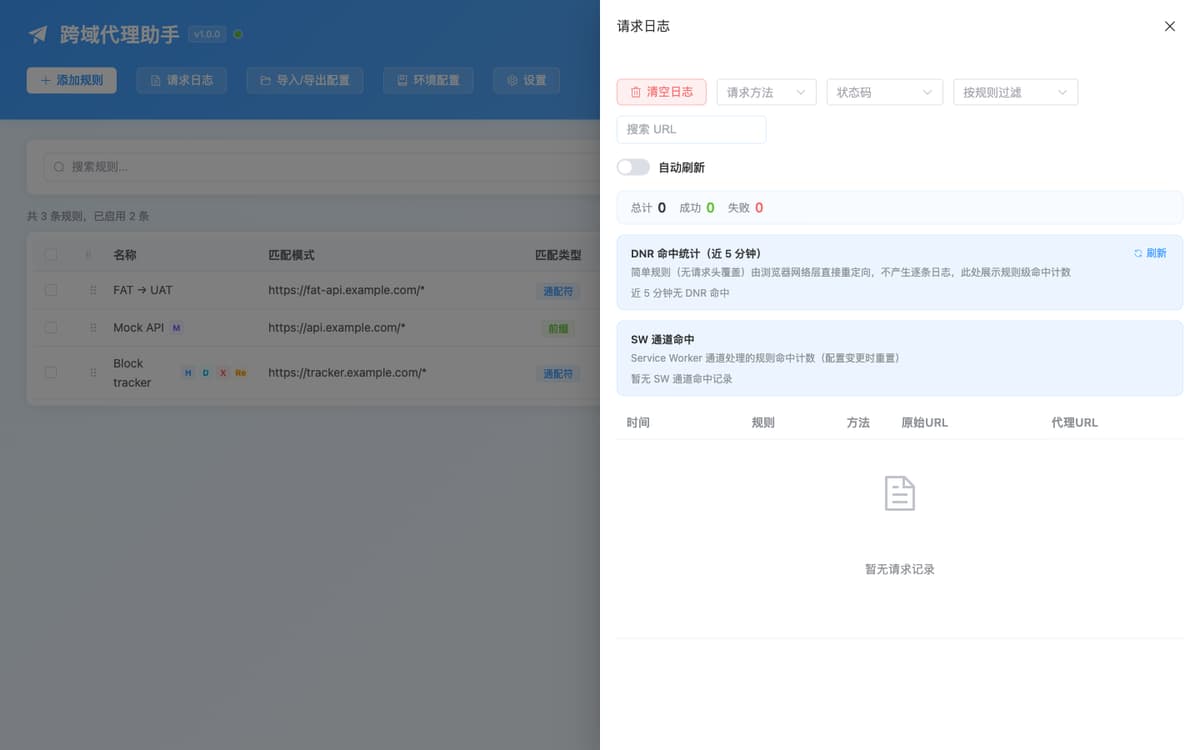
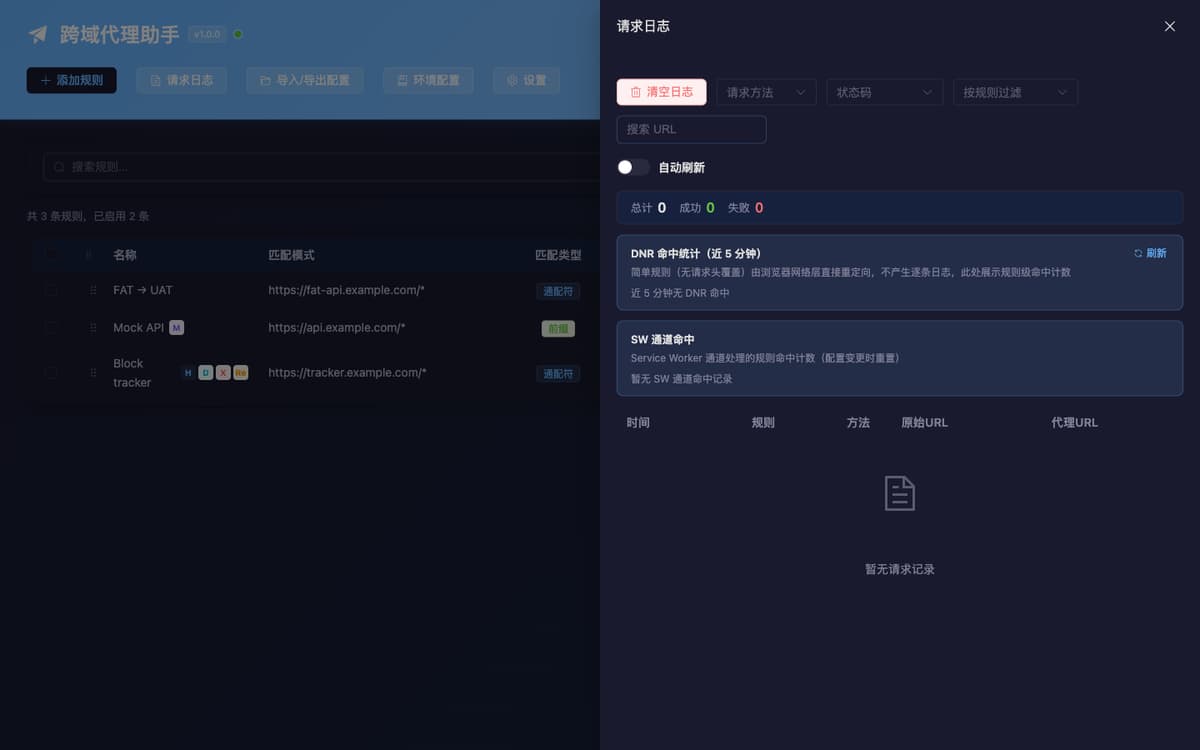
Request logLast 500 calls, filterable by method, status, rule and URL, with optional auto-refresh; the
original and proxied URLs sit side by side, the detail view copies as cURL, exports HAR, and can
save that very response as a Mock rule (matched by path, disabled until you enable it), and
network-layer and background hits are counted in their own sections.
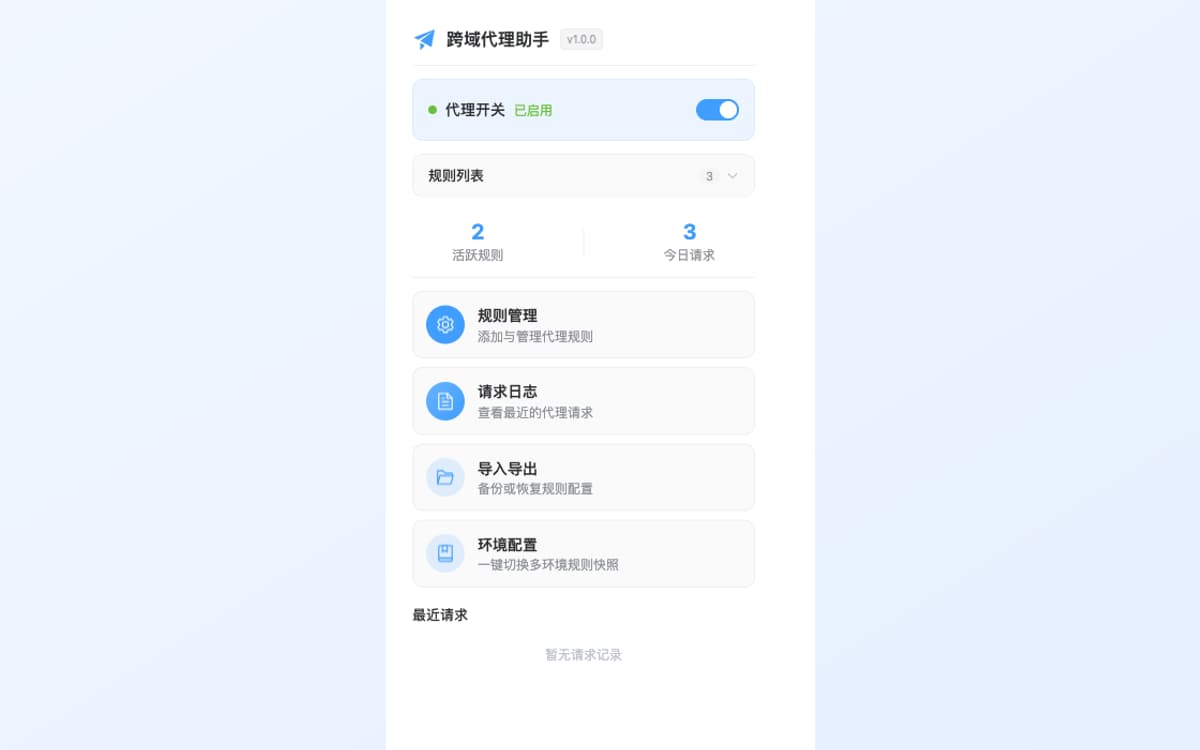
PopupMaster switch and auto-off presets, active rules and today's extension-proxied requests; the
per-site switch scopes the proxy by host (subdomains included, scheme and port make no
difference); the page card gives the matched rule, forwarding channel and rewritten URL right
away.
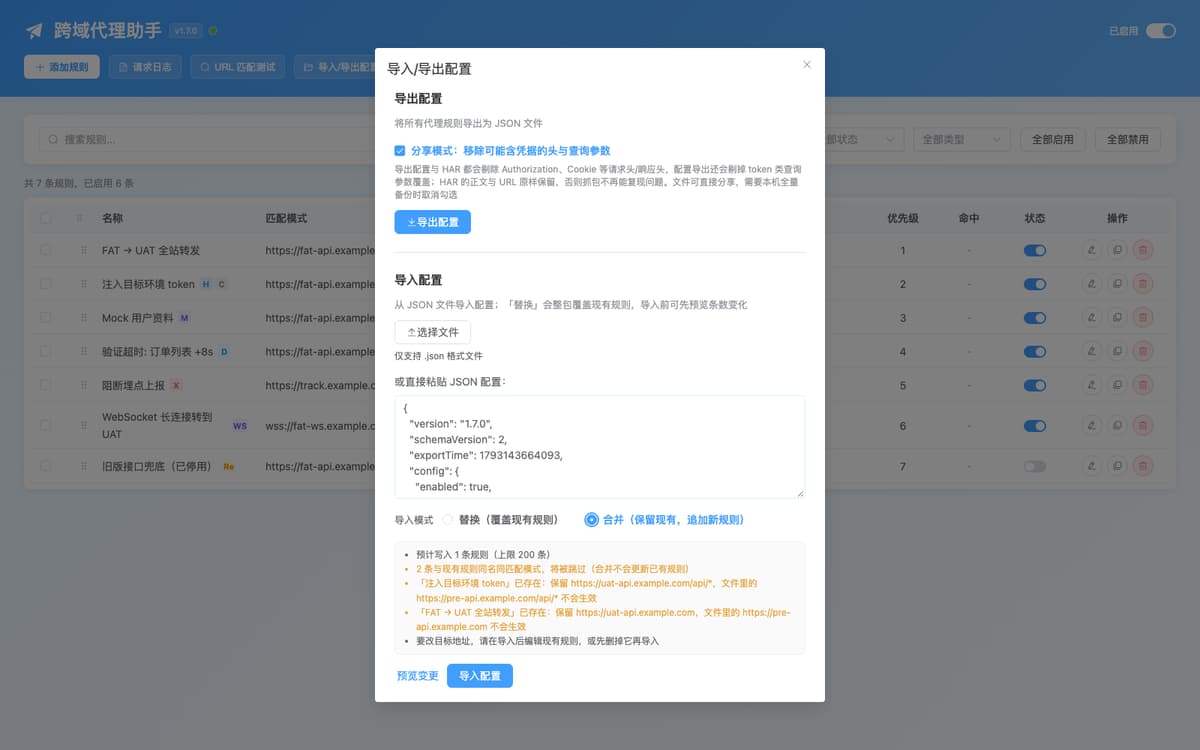
Import and exportPaste or pick a JSON file, then hit Preview: how many rules get written, which ones are skipped
for sharing a name and match pattern, and which target URL would take no effect — all of it before
anything is written. The same dialog handles export with credential-stripping share mode, cURL and
HAR import, and the restore points taken before a whole-set replace.
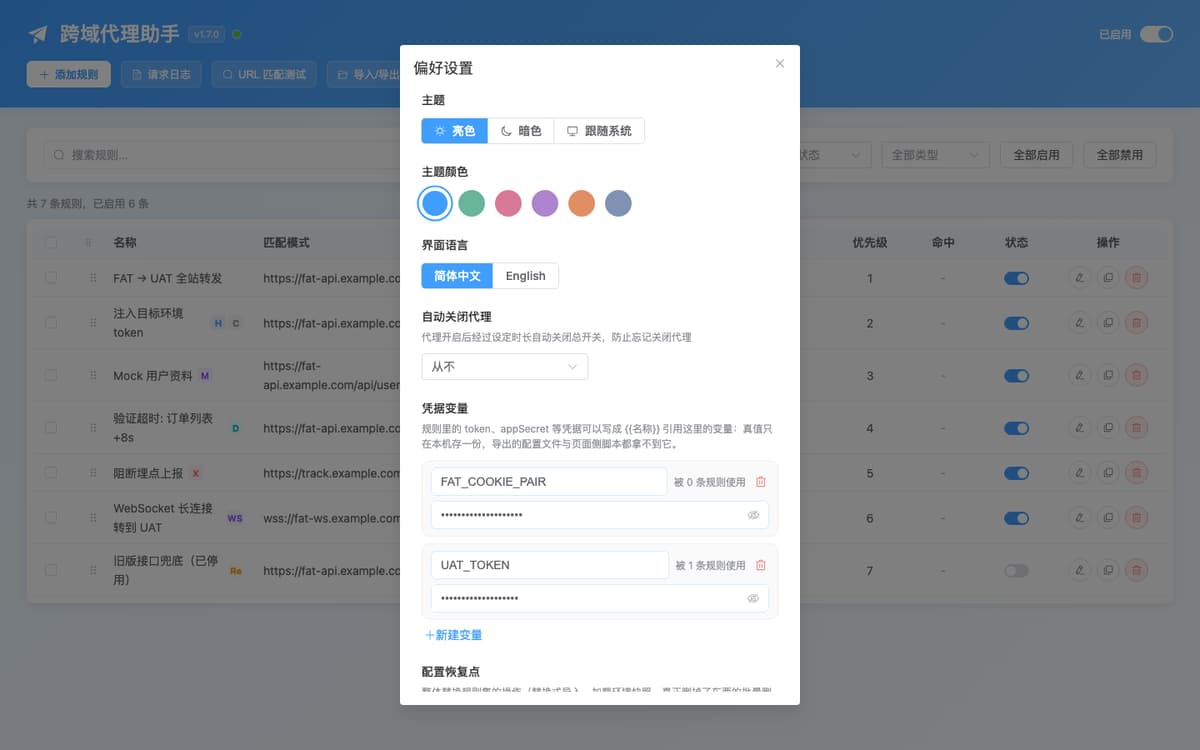
Credentials and preferencesTokens and app secrets live in one local table; rules reference them as {{NAME}} and
the real value is expanded only at send time. Config exports, share mode, the request log and
page-side scripts never see it. The same dialog carries theme, language and auto-off.
Themes and languageSix colour themes with light, dark and follow-system modes, switchable between English and
Chinese — synced across popup, options and in-page UI.
How it works: network-layer redirect and background fetch
Every enabled rule is classified on each config sync, straight from storage. That classification decides
whether the browser's network stack or the extension's background worker answers the request, and it is
the same classifier the match tester reports. The global switch sits above both channels: turning it off
removes the network-layer rules and makes the background worker pass requests through untouched.
Page issues a requestfetch · XMLHttpRequest · WebSocket
↓
One enabled rule matcheslowest priority number wins; no match means the request goes through
↓
The rule's capabilities route itclassified on every config sync, not guessed per request
↓
Channel A · browser network layer
Simple ruleURL rewrite only — none of the items below
↓
declarativeNetRequest redirectrewritten by the network stack · zero JS per request
↓
Target environment repliesstill a cross-origin request, so same-origin policy applies (see CORS below)
Page interceptor (main world)takes over fetch / XHR / WebSocket · postMessage to own origin only
↓
Bridge (isolated world)relays over chrome.runtime; non-string bodies stay on the native path
↓
Background worker sends and repliesholds host permissions · builds the response for the page
Both channels run off the same rule set — the only difference is who rewrites the request. Turning the
global switch off removes the network-layer rules and makes the background worker pass requests through
untouched.
A rule stops being “simple” as soon as it has any of
The exact conditions that switch a rule to the background channel, and why
Capability
Why the network layer cannot do it
Request header or body override
A body replacement needs a real request to be re-issued, not a redirect.
Response status code, header or JSON field override
The response has to be read and rebuilt.
Mock (with or without conditions), delay, block, retry
These change whether, when and how often a request happens at all.
HTTP method filter
Redirect rules cannot be conditioned on the request method.
Query parameter injection
Applied after rewriting, outside what redirect substitution can express.
WebSocket (ws:// / wss://)
declarativeNetRequest has no WebSocket resource type.
Wildcard pattern not ending in *, or an empty target URL
Substitution would silently drop trailing text or produce an invalid redirect value.
CORS, precisely
Background-channel requests are issued by the extension, which holds host permissions, and the page receives
a response the extension constructed — page CORS checks do not apply. A pure URL rewrite stays an ordinary
cross-origin request: the browser applies the same-origin policy to the redirected response and still needs
Access-Control-Allow-Origin to cover your origin. If a target environment does not allow your
origin, give the rule any capability (a response header override is the cheapest) and it changes channels.
If interception fails, the page falls back to its native fetch,
XMLHttpRequest or WebSocket, and non-string bodies (FormData, Blob, ArrayBuffer)
go down the native path rather than being silently dropped. Block rules are the deliberate exception: a
blocked request is never replayed, because that would send the very request you asked to suppress.
chrome.storage.local is the single source of truth. Service-worker caches — compiled regexes,
the rule list, hit counters — are rebuildable and are invalidated on every config change, so the extension
stays correct across worker restarts.
Get started in four steps, from install to your first rule
No account, no server, no certificate to install. From clone to first proxied request in about a minute.
01
Build
Requires Node.js 20+ and pnpm 10. No toolchain? Every tagged release attaches a prebuilt zip at
Releases
— once the first one exists, unzipping it is all the install needs.
git clone https://github.com/liaolongdong/cross-origin-proxy
cd cross-origin-proxy
pnpm install
pnpm build
02
Load
Open chrome://extensions, enable Developer mode, click Load unpacked and
select .output/chrome-mv3 — or the folder you just unzipped from the release. Pin the icon.
Set a priority (lower number matches first) and save.
04
Verify
Reload the page. A wildcard rewrite like this one runs in the browser's network layer, so it writes no
per-request log entry: preview the URL in the match tester and watch the rule's DNR hit count instead.
Only background-channel requests appear in the request log.
Try a rule: the rewritten URL, and the channel that actually carries it
This panel runs the same matching and rewriting judgement the extension uses. Edit the four fields and the
answer changes on the spot. It makes no requests, and what you type never leaves this page.
Rewritten by the background channel
Rewritten by the network layer
The two lines differing is not a defect in either one: the background channel replaces only the part of
the URL the regex matched, while the network layer replaces the whole URL with the substitution. Whichever
channel the sentence above names is the one that runs.
This one already passed the preview — take the pattern and target with you:
How to use it: install the extension, open the options page → "Import / Export" → paste this JSON into
the "Or paste JSON config" field. It carries just this one rule (enabled); the global proxy switch stays
off — you decide when to turn it on.
How to import this rule (3 steps)
Click “Download .json”, or copy the JSON and save it as a .json file.
Open “Import / Export” in the extension's options page and select that file.
Choose “Merge (keep existing, add new rules)” as the import mode, then confirm.
“Replace” would overwrite all your existing rules and switch the proxy off.
The rule itself is enabled, but the file will not turn the master switch on for you: if the proxy is
off, enable it from the popup. The file contains only the match type, pattern and target — no headers
and no credentials.
The target URL is empty: the address is not rewritten and the request is only forwarded, so this kind of
rule always uses the background channel.
The wildcard pattern does not end with *: a network-layer substitution can only reference
capture groups, so the fixed text at the end would be lost — the rule goes to the background channel
instead. Its rewrite only understands a trailing * as well, which is why the row above
still shows the original URL: that request is proxied as it is, changing headers, body or the mock — not
the address.
A WebSocket handshake is not a resource type the network layer can express, so only the page-side
interceptor can proxy it.
One judgement stays with the extension: whether Chrome's RE2 engine accepts a network-layer rule. This
page cannot call that API, so for regex patterns trust the “not applied” marker inside the options page.
Updating an unpacked build: overwrite the files in the same folder. Loading from a
different folder makes Chrome treat it as a new installation with a different extension ID, and rules,
logs and profiles are stored per ID in chrome.storage.local — the old set would look empty.
Use cases: environment switching, mock data, slow network, errors
The shortest path from a situation to a configuration. Every row below is the extension's actual
behaviour, not a workaround.
Common setups and the capability each one uses
Situation
Rule configuration
Channel
Verify a UAT-only fix from a FAT page
Wildcard rewrite of the API prefix to the UAT host.
DNR
Build UI before the backend exists
Mock response with a crafted body and status; add conditions to vary it per endpoint.
SW
Prove the loading and timeout paths work
Delay of 3000–60000 ms on the specific endpoint.
SW
Check the offline or 500 fallback UI
Block the request, or override the response status.
SW
Flaky upstream? Make reads resilient
Retry 2–5 times with a 1000 ms interval.
SW
Exercise a gray-release or A/B branch
Query parameter injection, e.g. __env=uat.
SW
Send only writes to the test backend
Method filter limited to POST / PUT / DELETE.
SW
Debug a real-time feature against another environment
WebSocket rewrite from the page's socket URL to the target socket.
SW
Keep a FAT page from breaking on a missing field
JSON field replacement, e.g. data.token → "mock-token".
SW
The target environment rejects your origin
Add any capability, e.g. a response header override, to leave the network layer.
SW
Hand the same setup to a teammate
Export JSON (share mode strips credentials by default), or share a HAR-derived rule set.
—
Environment rotated to a new domain
Batch migrate targets with a change preview.
—
How it compares to a devServer proxy, capture tool or header modifier
Columns are tool categories, not products: capabilities vary inside a category, so check the
details against what you already use.
Cross-environment debugging and request rewriting, the usual ways. Colours read from your side: green is
favourable for that row, orange is partial, grey is absent.
Approach
This extension
Dev-server proxy
Capture proxy tool
API client / header-modifier extension
Editing app config
Needs a backend or gateway change
No
Often, for CORS
No
No
No
Configured per project
No — browser-wide
Yes
System-wide
Per rule set
Yes
Works on any page origin (localhost, internal tools)
Yes
Only traffic to that dev server
Yes
Limited by the extension API
Yes
Rewrites responses (status, headers, JSON fields)
Yes
No
Yes
Usually not the body
No
Mock / delay / block / retry from the UI
Yes, conditional mock included
With extra plugins
Yes
Mock only, typically
No
Covers WebSocket traffic
Yes
Rarely
Yes
No
No
Needs a local CA certificate to read HTTPS
No — runs inside the browser
No
Yes
No
No
Rules shareable as a plain local file
Yes — JSON / HAR / OpenAPI / cURL
Yes — in the repo
Session files
Often cloud-synced
Yes — in the repo
Can proxy server-to-server or non-browser traffic
No — browser-scoped
No
Yes
No
Depends
The trade-off is stated plainly: this is a browser tool. It cannot help a server-to-server call, it records
nothing to a cloud workspace, and its rules live in your Chrome profile rather than in a shared project file
— export JSON when you want a teammate to have them. Where a capture proxy is the right tool for system-wide
traffic, this extension is the right tool for “this page should be talking to that environment”.
A recent desktop Google Chrome (Manifest V3). We recommend installing from
Chrome Web Store, or building from source by loading the unpacked build from .output/chrome-mv3 — or
loading the prebuilt zip downloaded from
Releases, which every
v* tag attaches. Edge runs Chromium extensions, so the same build normally works there;
Firefox is not a supported target today because of declarativeNetRequest differences.
Chrome itself blocks every extension on chrome:// pages, the Web Store and other extension
pages.
Build requirements
Node.js 20 or newer and pnpm 10 (see packageManager). Built with
WXT
+ Vue 3 + TypeScript + Element Plus + Vite, with Element Plus imported per component so the bundle stays
small; Vitest covers the matching, rewriting and import/export logic.
Developer commands
pnpm dev          # WXT dev server with HMR (port 8899)
pnpm build        # production build → .output/chrome-mv3
pnpm build:zip    # zip for store upload
pnpm test         # vitest unit tests
pnpm typecheck    # tsc --noEmit
pnpm lint         # eslint
pnpm lint:style   # stylelint
pnpm assets       # regenerate store and landing images
Privacy and permissions: your data stays local
Everything is stored on your machine in chrome.storage.local. There is no account, no
analytics, no telemetry and no remote service: the only network traffic is the API traffic you ask it to
proxy. Logs and exports are produced locally — and because the log records what it proxied, remember that
headers may carry tokens before you share an exported file.
Read the privacy policy.
Every permission the manifest declares, and what it is used for
Install the network-layer redirect rules that make simple rewrites cost zero JavaScript.
declarativeNetRequestFeedback
Read which redirect rules actually matched, for the hit statistics in the log drawer.
alarms
Keep the background worker alive while proxying, and run the auto-off countdown.
<all_urls> host permission
Proxying has to work on whatever origin your frontend runs on; the target environment is a
developer-controlled internal domain, so it cannot be enumerated in advance.
Limits, enforced in code
Hard ceilings you can rely on when planning a rule set
Constraint
Value
Rules
200 maximum when adding, batch-adding or merging; a replace-mode import writes the file as-is
Credential variables
50 maximum (names ≤ 64 characters, values ≤ 4096 characters)
Config restore points
The last 5 whole-rule-set snapshots, kept within a budget of about 1M characters
Import file
2 MB maximum, refused before the file is read with the reason stated — never partially imported
HAR entries
5000 maximum per import, refused before anything becomes a rule (checked once on the page, once in
the background)
Request log
Last 500 entries (ring buffer)
Request body
10 MB maximum
Response body
10 MB maximum; over it the request fails without truncation (fetch falls back to sending natively,
XHR fails with status 0)
Injected delay
0 – 60000 ms
Retry
0 – 5 attempts, configurable interval
Proxied request timeout
30 s
Mocked or overridden status code
Clamped to 200 – 599
Auto-off countdown
30 minutes, 1 h, 2 h or 4 h
Cross-origin proxy FAQ
Everything on this page is also machine-readable: the same questions and answers are published as
FAQPage structured data, and llms.txt summarises the product for AI
assistants.
It intercepts the API requests a page makes and sends them somewhere else. In development that usually
means pointing a frontend running against one backend at a different environment, so you can test UAT
code from a FAT page without editing the app or redeploying.
Which requests can it intercept?
The page interceptor patches fetch, XMLHttpRequest and
WebSocket in the page's main world, and relative URLs are resolved to absolute ones before
matching. Rules that only rewrite the URL are compiled into
declarativeNetRequest redirects, which the browser applies to matching requests of every
resource type: main and sub frames, XHR, scripts, stylesheets, images, fonts, media and other.
How do wildcard, prefix and regex matching differ?
Wildcard treats * as any text and appends whatever the trailing * captured to
the target URL. Prefix matches the beginning of the URL and appends the remaining part. Regex must cover
the whole URL: the background channel replaces only the part the pattern matched, while the network
layer replaces the URL entirely, so anchor the pattern with ^ and capture the tail with
(.*)$ if you want both channels to agree. When several rules match, the lowest priority
number wins; ties keep the order shown in the rule table, so give each rule its own number.
Does it work on any website?
It is injected on all http and https pages, and rules match on request URL, so
it works on internal tools, localhost dev servers and staging domains alike. It does not
run on chrome:// pages, the Chrome Web Store, or other extension pages, which Chrome
restricts for every extension.
Is it free? Do I need to sign up?
It's free — no in-app purchases, no subscription, and no account to register or sign into. There is no
cloud service of its own: rules, credential variables and logs live only in
chrome.storage.local on this machine.
Channels, CORS and performance
Does this bypass CORS restrictions?
Rules that use any advanced capability (header override, body override, response override, mock, delay,
block, retry, method filter, query injection, sending cookies or WebSocket) are executed by the
extension's background context, which holds host permissions, and the page receives a response the
extension constructed — so page CORS checks do not apply. A pure URL rewrite is handled as a
network-layer redirect instead, where the browser still validates
Access-Control-Allow-Origin on the redirected response. If a target environment does not
allow your origin, add any advanced capability (a response header override is the cheapest) and the rule
switches to the background channel.
Why does the backend reject my request after a rewrite (Origin null)?
A hard boundary of the network layer, measured on Chrome 155: a pure URL rewrite that sends the request
to a different origin arrives with Origin: null instead of your page's own
origin, while a rewrite that stays inside the same origin is unaffected. Once the origin is
null, a backend that allowlists by origin turns the request down even if it already allows
your frontend domain, and the page sees net::ERR_FAILED. Two ways out: let the target
environment allow any origin, or add an advanced capability (a response header override is the cheapest
one) so the rule switches to background forwarding — that request is made by the extension itself, so
page CORS never enters the picture.
Why do some rules use a different forwarding channel than I expected?
Because the network layer cannot express what you asked for. A wildcard that does not end in
*, an empty target URL, or any advanced capability is routed to the background channel on
purpose, since compiling it anyway would silently change the redirect result. The URL match tester shows
the channel for any URL before you rely on it.
Will it slow my page down?
Rules that only rewrite the URL cost no JavaScript per request — the browser resolves them in its
network stack. Background-channel requests add one extension hop plus whatever delay you configure, and
each proxied request has a 30 second ceiling. User regexes are checked for nested-quantifier ReDoS
patterns before use, and regular expressions heading for the network layer are validated against
Chrome's RE2 engine first, because one unsupported pattern would make the whole batch of rules fail to
install.
Why is there no per-request log entry for my simple rules?
Network-layer redirects never reach the extension, so there is nothing to log per request. Their
rule-level hit counts appear under DNR hits for the last five minutes; the quota Chrome allows for that
read is limited, so the panel refreshes on demand, keeps the previous numbers when the quota is
exhausted and says the stats may lag. Background-channel hits are counted separately.
My rule looks right but the page doesn't change — what should I check, in order?
In this order: whether the popup's master switch is on (turning it off also uninstalls the network-layer
rules) → whether that rule itself is enabled → whether the page has been reloaded, because requests
already sent are never rewritten retroactively → paste the real request URL into the URL match tester to
see whether a rule with a smaller priority number shadows it → if you use a regex, confirm it covers the
whole URL: the network layer replaces the entire URL with the substitution, the background channel only
the matched span, so a partial regex lands on two different results — the tester now puts both addresses
on the screen and points at the step where they fork. Complex rules give you one more clue — when the
background actually recorded that this page never received that config push, the popup reads “This page
has not received the latest rules — reloading it usually fixes it” with a “Reload this page” button
sitting to the right of that sentence (it appears only when the popup actually got that page back on
this read, and pressing it does exactly what the browser's own reload does), and hovering names which of
the two causes it is: the document predates an install, update or reload of the extension (reloading
fixes it), or the extension is disabled for this site (re-enable it from Chrome's extension menu). It
only says what it is sure of: non-http(s) pages, documents still loading and pages that never had this
record stay silent. One more case is a page with no rule covering it at all: the popup's “create a rule
for this page” then says up front which origins look blocked by CORS — those origins carry a “suspect”
marker and sort first, and they come from the page's own failing native requests that no rule caught. A
CORS block, an offline page and a DNS failure are the same shape, so it is a clue about what to build
first, not a verdict. If you would rather ask all of it at once, the “Self-check” card in the popup's
action grid (the options page also opens it at #self-check) puts five existing readings on
one screen in this same order: the master switch, whether this host is inside the site scope, whether
the background recorded that this page never received the last config push, which rule the page's
address matches and which channel carries it, and whether the network-layer rules are actually installed
in the browser. Each cell only restates a judgement already computed elsewhere; what it cannot read
stays “unknown” and what has not landed yet stays “not yet”, instead of answering for the step above it.
Mock and failure injection
What can mock mode do beyond returning a static body?
One rule can carry a list of conditions — a URL pattern, an HTTP method and query parameters — and the
first matching condition decides the body, status code and content type, falling back to the rule's
default body when none match. That lets a single mock stand in for several endpoints, or for several
states of one endpoint. Mocked requests never touch the network, and returned status codes are clamped
to 200–599.
What is the difference between blocking a request and forcing a 500?
A block rule makes the request fail the way a network failure does, which is what exercises offline and
retry handling. Overriding the response status instead gives you a real HTTP error code, status text and
headers, which is what exercises error rendering that depends on the code. Blocked requests are never
replayed by the native fallback — otherwise the extension would send exactly the request you asked to
suppress.
How does the retry capability work?
Retrying sits behind a per-rule switch and runs on the background channel. Switched on, a rule makes 1
to 5 extra attempts after the first, spaced by an interval you set between 100 and 30000 ms (default
1000). An attempt is retried when it throws — including the 30 second per-attempt timeout — or when it
returns a 5xx status while attempts remain; the last response or error reaches the page once the budget
is exhausted. Because retrying is a background-channel capability, a rule that uses it never becomes a
network-layer redirect.
Sharing, limits and safety
Can I share rules with my team?
Yes. Export the full configuration as JSON — share mode is on by default, stripping Authorization,
Cookie and similar request/response headers plus token-like query parameters, untick it for a verbatim
local backup — and teammates import it either as a replacement or merged into what they already have.
Export captured traffic as a HAR 1.2 file, or import a HAR recorded elsewhere to create rules
automatically. Anyone can paste a cURL command — DevTools “Copy as cURL” output — to prefill a rule.
Environment profiles store a named snapshot of the whole rule set. Once the credential slots in a rule
are written as a reference such as {{UAT_TOKEN}} with the real value kept under Settings → Credential
Variables, neither the exported config nor a profile contains it at any point, so unticking share mode
carries nothing out either.
What are the limits?
Up to 200 rules, the last 500 request log entries, a 10 MB request body ceiling, the same 10 MB ceiling
on the response body (over it the proxied request fails without truncation: fetch falls
back to sending natively, while XHR does not fall back and fails with status 0), delays
between 0 and 60000 ms, retry off by default and then 1 to 5 extra attempts at 100–30000 ms, a 30 second
ceiling per proxied request, and response status codes clamped to 200–599 so the page can always
construct a valid Response object.
What happens if the extension fails to handle a request?
Fallback differs by channel. fetch falls back to the native request whenever interception
or proxying fails (timeout, over-cap, a background error); XHR falls back only where
proxying cannot deliver at all — a synchronous request or a non-string body — and on a failed hand-off
it does not replay, it sets status to 0 and dispatches error, so a write is
not executed twice; WebSocket is always opened natively, with the extension only rewriting
the address. Synchronous XHR and non-string bodies have to fall back because proxying means a round trip
through other contexts, which cannot deliver the "the result is ready when send() returns"
contract — making it async would only hand the page an empty response. The single exception is a block
rule: a blocked request is never replayed natively.
How do I install a rule I tried on this page?
Click “Copy rule JSON” or “Download .json” in the preview panel, then open “Import / Export” in the
extension's settings page and pick that file. Choose “Merge (keep existing, add new rules)” as the
import mode, then confirm. Merge leaves your current rules alone and does not turn the master switch on
for you, so if proxying is still off, switch it on from the popup. The file holds one rule — match type,
match pattern and target URL — with no headers, query parameters or credentials.
Can I import a Vite or webpack devServer proxy config?
No. A devServer proxy forwards site-relative paths such as /api, and the browser's request
stays same-origin; the backend environment it points at lives in the devServer config and never appears
in the URL the browser actually requests. Extension rules match on that request URL, so none of those
entries would ever match a real address, and the file's shape is not the extension's import format
either. Create a wildcard rule from the real API origin instead — for example
https://fat-api.example.com/* to https://uat-api.example.com; the panel's
“Fill the pattern from this URL” generates exactly that pattern.
Privacy and compatibility
Is my data sent to a server?
No. Rules, logs, profiles and preferences live in chrome.storage.local on your machine. The
extension contains no analytics, no telemetry and no remote service of its own; the only network traffic
is the API traffic you ask it to proxy. Note that the request log records the headers and bodies it
proxies — including any tokens — locally, which is worth remembering before you share an exported HAR or
a copied cURL command.
Does it work in Firefox or Edge?
It is built and tested against Chrome (Manifest V3). Edge runs Chromium extensions, so the same build
normally works there; Firefox's Manifest V3 support differs around declarativeNetRequest,
so it is not a supported target today.
More extensions by this author
Same author, same rules: Manifest V3, open source, data stays on your machine, no service of our own. They
are often switched on together while debugging.
A local-first open-source password manager: Ctrl +
Shift + F logs you in (fill, tick, click), isolates
dev / test / staging / prod accounts by exact host, and ships TOTP, an offline security audit and a
generator — everything encrypted with AES-256-GCM on your machine. It answers "who am I in this
environment"; this extension answers "where do this environment's requests go".
14 formats converted in the browser, not one byte uploaded: Markdown, Word, PDF, Excel, CSV, JSON, HTML
and images all convert on your own machine, with mixed-format batches, automatic multi-step chains,
preview and inline editing, and ZIP packaging. No account, no upload, no network request.