
离线 · 无上传 · 浏览器本地完成Offline · no uploads · runs in the browser
PNG 转 JPEG——透明铺白底,质量与目标体积可调PNG to JPEG — transparency flattens onto white
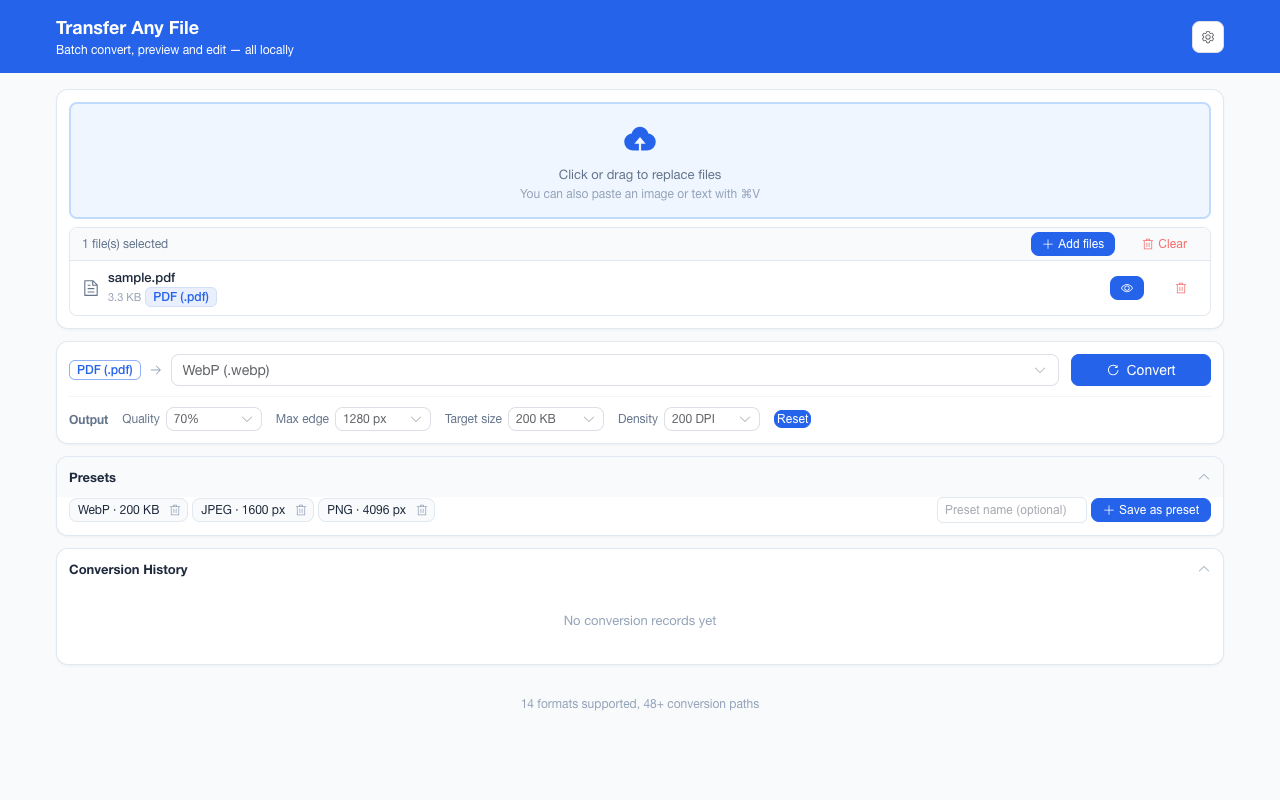
JPEG 没有 alpha 通道,所以「PNG 转 JPEG」的第一件事不是压缩,而是替透明区域做一个决定。这里的答案是确定的:画布先铺纯白再把图画上去,透明变成白底,不会出现黑底,也不会留下半透明的边。第二个决定是质量:面板给六档(40%–90%),留空则由编码器自己判断。第三个是目标体积,它的行为有讲究——先沿质量阶梯往下试,质量到底仍够不着才开始缩像素,所以「目标 200 KB」是被追的上限,不是承诺值。JPEG has no alpha channel, so converting PNG to JPEG starts with a decision about the transparent areas rather than with compression. The answer here is fixed: the canvas is filled pure white before the picture is drawn, so transparency becomes white — never black, never a half-transparent fringe. The second decision is quality, offered as six steps from 40% to 90%, with an empty setting meaning “let the encoder judge”. The third is a target size, and its order of operations matters: the quality ladder is walked first and only when it bottoms out does the encoder give up pixels, so “target 200 KB” is a ceiling being chased, not a promise.
这条链路怎么走How the route runs
PNGPNG JPEGJPEG
共 1 步,由扩展的路径搜索自动选出,中间产物不落盘。1 step, chosen by the extension's own path search; intermediate results never touch the disk.
会保留什么What carries over
- 透明按纯白展平:既不是黑底,也没有棋盘格或半透明残留Transparency flattens onto pure white — no black background, no checkerboard, no translucent fringe
- 质量档 40%–90% 与目标体积 20 KB–2 MB 在输出面板里选,两者只在链路末尾那次编码生效Quality steps from 40% to 90% and target sizes from 20 KB to 2 MB, chosen in the output panel and applied only at the final encode of the route
- 目标体积按「先质量、后像素」的顺序追,够不着时给回当前最小的结果而不是报错A target size is chased in that order — quality first, pixels second — and an unreachable target returns the smallest result rather than an error
- 最长边可先缩到 800–4096 px;编码器另有 8192 px 硬上限,超过是先缩而不是静默裁切A longest edge of 800–4096 px to shrink to, backed by a hard 8192 px encoder ceiling: oversized renders shrink instead of clipping
- 一批最多 200 张,混合来源格式也行,结果可一次打包成 ZIPUp to 200 images per batch with mixed sources, the batch downloadable as one ZIP
如实说明的限制What it does not do
- alpha 是丢掉的,而且不可逆——需要透明请留 PNG 或走 WebPThe alpha channel is gone and there is no way back — keep PNG or take WebP when transparency matters
- 有损编码每次转手都在丢信息:请从原始 PNG 出发,别把 JPEG 反复转来转去Lossy re-encodes subtract: start from the original PNG rather than handing a JPEG through again
- 画布是每通道 8 位,16 位 PNG 的额外精度与宽色域标记不在这条路的保留范围里The canvas is 8-bit per channel, so extra precision from a 16-bit PNG and wide-gamut tags do not survive this route
- 动图 PNG(APNG)在这条路只留下一帧:实测一份 Pillow 生成、浏览器能正常解出的双帧 APNG(`naturalWidth` 为 24),转换完成并产出一张静帧 JPEG,而界面上没有任何丢帧提示——那项检查只对 GIF 生效An animated PNG (APNG) yields one frame here: measured with a Pillow-written two-frame APNG that the browser decodes normally (`naturalWidth` 24), the conversion completed into a single still JPEG, and no frame-loss notice appeared — that check covers GIF only
- 元数据不进产物:JPEG 装得下 EXIF,但这条链路交给它的只有像素No metadata is written: JPEG can carry EXIF, but this route hands it pixels only
实操提示Working with it
- 输出面板里的设置会被记住,同一批的所有图片共用一次设置The panel settings persist between runs and apply to every image in the batch from one read
- 三种可写图片格式(PNG / JPEG / WebP)共享同一套参数语义,换目标再跑一批即可同时出多种格式The three writable formats (PNG, JPEG, WebP) share one quality vocabulary, so a second batch with another target gives you both
常见问题Questions people actually ask
为什么透明变成白底了?Why did transparency turn white?
JPEG 这个格式没有 alpha 通道,必须有一个不透明底色。本项目选择纯白并把它写在实现里,好处是「白」是确定的,而不是各浏览器的默认底色。JPEG has no alpha channel, so an opaque background is mandatory. White is chosen and written into the implementation, which makes the result predictably white rather than whatever a browser defaults to.
质量该选哪一档?Which quality step should I pick?
面板给的是 90 / 80 / 70 / 60 / 50 / 40%。想少做决定就留空(由浏览器定),想控制观感就从高档往下试;对网页图通常 70%–80% 已经接近原观感。The dial offers 90 / 80 / 70 / 60 / 50 / 40%. Leave it empty to let the browser decide, or step down from the top until it looks right; for web images 70%–80% is usually close to the original.
设了目标大小为什么还是超?Why did it still miss my target size?
可用的杠杆有尽头:质量降到最低、边长缩到下限以内仍不够时,产物就是当前最小可行结果。想更小只能改图像本身(尺寸、内容复杂度)。The levers bottom out: if the lowest quality and the smallest permitted edge still exceed the target, what you get is the smallest thing that still encodes. Below that you have to change the image — its size or how complex the content is.
不需要账号,也不需要联网:装好扩展后点图标,在新标签页里打开工作台,文件从磁盘直接选。No account and no network: install the extension, click its icon, and the workbench opens in a new tab reading straight off your disk.
从 Chrome 应用商店安装Install from the Chrome Web Store 安装步骤Install steps GitHub 源码Source on GitHub
要把它压到指定体积?Need it under a target size? The 图片压缩工具image compressor可以在浏览器里重编码 PNG / JPEG / WebP。 re-encodes PNG / JPEG / WebP in the browser.