
离线 · 无上传 · 浏览器本地完成Offline · no uploads · runs in the browser
PDF 转 PNG——本地逐页栅格化的无损位图,密度与最长边可调PDF to PNG locally — lossless page rasters, density set
这条和 PDF → JPEG 共用同一套渲染,区别只在最后那一次编码:PNG 无损,所以画面上有什么就留下什么,包括 JPEG 会先糊掉的细线与极小字号。代价是体积——一页密排文字的 PNG 通常比同一页的 JPEG 大不少,大多少由内容决定,这一页不替你写百分比。第二件事得说在前面:透明。这条转换在把页面画到画布之前先铺一层白,PNG、JPEG、WebP 三个终点一样处理,所以从 PDF 出来的图片没有透明区域;PNG 确实能带 Alpha,那是图片之间那几条路的用法。Same render as PDF to JPEG, different final encode: PNG is lossless, so whatever lands on the page survives — including the hairlines and very small type a JPEG blurs first. The price is size; a text-dense page as PNG usually sits well above the same page as JPEG, and how far above belongs to the content, so this page quotes no percentage. The second thing belongs up front: transparency. This converter paints each page white before the page is drawn onto the canvas, and PNG is treated exactly like JPEG and WebP, so nothing coming out of a PDF has transparent areas. PNG can certainly carry alpha — that is what the image-to-image routes use it for.
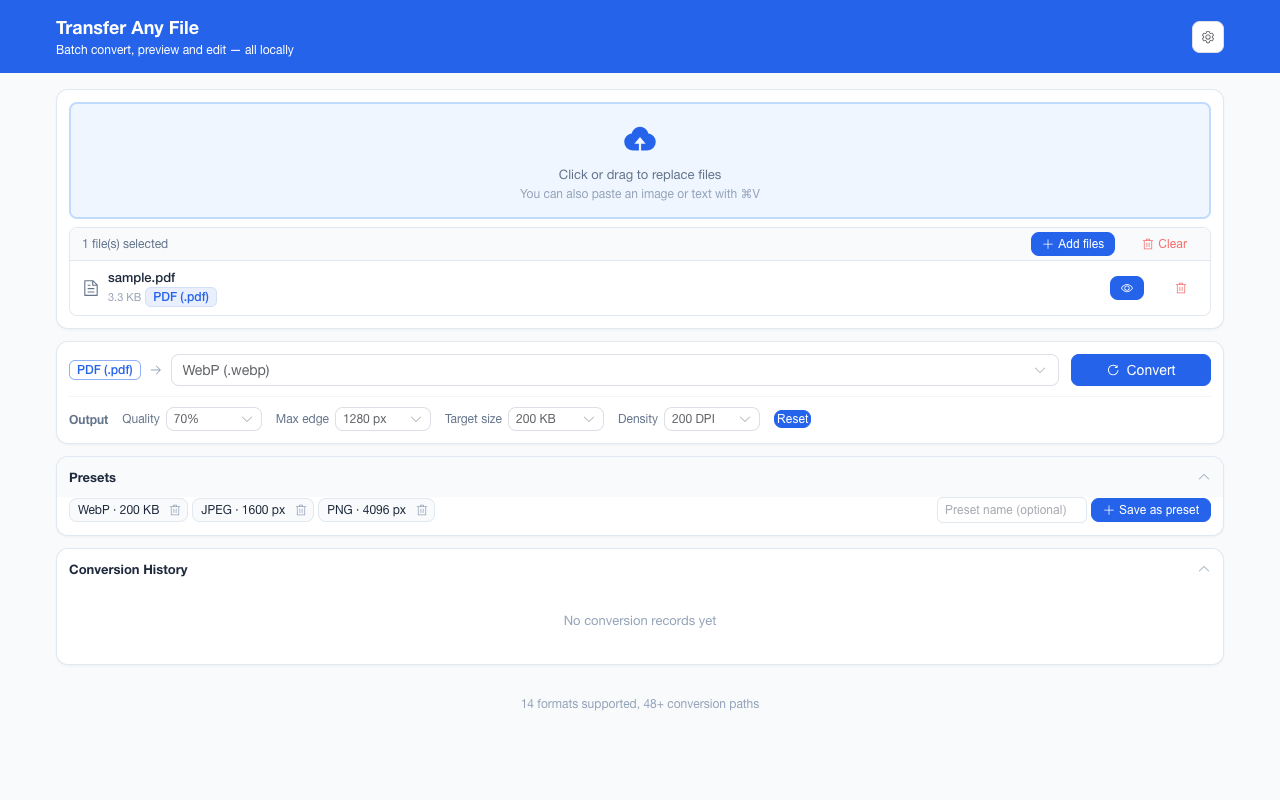
这条链路怎么走How the route runs
PDFPDF PNGPNG
共 1 步,由扩展的路径搜索自动选出,中间产物不落盘。1 step, chosen by the extension's own path search; intermediate results never touch the disk.
会保留什么What carries over
- 每一页独立成一张图,按 PDF 里的页码命名(`page-3.png` 就是第 3 页,只转第 3 页时也一样)Each page becomes its own image, named by its page number in the document — `page-3.png` is page 3, and stays page 3 when you convert only that page
- 渲染密度四档可选:96 / 144 / 200 / 300 DPI,默认 144;数值直接换算成 pdf.js 的页面缩放(DPI ÷ 72)Render density comes as 96, 144, 200 or 300 DPI with 144 as the default, converted straight into pdf.js page scale (DPI ÷ 72)
- 无损编码:这一条没有质量档,也不接受目标体积,编码器不会替你决定丢哪些像素A lossless encode: this route has no quality step and takes no target size, so nothing decides for you which pixels to discard
- 页面自身的矢量图形、文字的字形、颜色与渐变都按矢量渲染路径栅格化,不是截屏那种二次放大Vector shapes, letterforms and colour or gradients on the page are rasterised along the vector render path, not magnified from a screenshot
- 最长边可把整页等比缩到 800–4096 px 之间:先按密度画,再缩边,是缩放不是裁切A longest edge between 800 and 4096 px scales the whole page proportionally: it is drawn at the chosen density first, then shrunk — never cropped
- 超过浏览器画布上限(8192 px 一边)的页面自动按缩放上限收敛,是缩到能渲染,不是裁掉A page that would exceed the browser canvas limit (8192 px on an edge) is scaled down to fit rather than cropped
如实说明的限制What it does not do
- 产物是像素:文字不再是可选中、可复制的字符,也不能再被搜索;想保留文字层就转 HTML 或纯文本The output is pixels: text is no longer selectable, copyable or searchable. Keep the text layer by going to HTML or plain text instead
- 透明不保留:渲染前每页先铺一层白,PNG、JPEG、WebP 三个终点一样处理,所以从 PDF 出来的图一律没有透明区域Transparency does not survive: every page is painted white before it renders and all three image targets are handled the same way, so a picture out of a PDF has no transparent areas
- 体积是三条图片终点里最大的一条,而且没有质量档可换——要控体积就用最长边,或者换 WebPIt is the largest of the three image targets, with no quality step to trade against size — use the longest edge, or take WebP, when the bytes matter
- PDF 内嵌的表单控件、批注、书签与附件不进图像;页面里"看起来是图片"的部分会跟着渲染进去,但无法再按对象取出Form fields, annotations, bookmarks and embedded files are not part of the image; whatever looks like a picture on the page is rendered in, but cannot be lifted out as an object
- 扫描件在这里只是分辨率更高的图片,仍然提取不出文字——项目不含 OCRA scan comes back as a higher-resolution picture of a scan, still without extractable text — the extension ships no OCR
实操提示Working with it
- 只想转其中几页:在页面范围里填 1,3-5 这类写法。填了的范围在这份文档里一页都对不上时会直接报错,而不是"干脆全给你"To convert only some pages, type a range such as 1,3-5. A range that matches no page in this document fails outright instead of quietly handing you the whole file
- 单页 PDF 直接得到一张 .png;两页以上才打包成 ZIPA one-page PDF gives you one .png directly; two or more pages arrive inside a ZIP
- 一批最多 200 个文件、单个文件 100 MB 上限;长文档先跑一页看体积,再决定要不要全量Up to 200 files per batch with a 100 MB per-file ceiling; on a long document, render one page first to see what it costs before running the lot
常见问题Questions people actually ask
什么时候该选 PNG 而不是 JPEG?When should I take PNG over JPEG?
还要再编辑这张图(抠图、标注、再压一次)、页面上有极小字号或细线、或者你要的是一份"不再叠一层有损"的存档——这几种情形选 PNG。要发群里、要体积、要"任何设备都打得开"——选 JPEG 或 WebP。三条路的 PDF 输入完全一样,同一份文档混着试的成本很低。Take PNG when the image will be edited again (cut-outs, annotations, another compression pass), when the page carries very small type or hairlines, or when the point is an archive that adds no lossy pass of its own. Take JPEG or WebP for messaging, for size, or for "this has to open anywhere". The PDF side is identical across all three, so trying them against one document is cheap.
PNG 不是支持透明吗,为什么我的结果是白底?Doesn’t PNG support transparency? Why is my result white?
格式支持不等于这条链路有内容可装。这条转换在把页面画到画布之前先铺一层白,三个图片终点都是这么画的,所以原本会透空的地方在结果里就是白的。需要保留透明请在图片格式之间转——SVG 转 PNG、PNG 转 WebP 那几条是真的带 Alpha 的。A format being capable is not the same as this route having anything to put in it. The page is painted white before it is drawn, for all three image targets, so where the page would have been transparent the result is simply white. Where transparency is the requirement, convert between image formats instead — SVG to PNG and PNG to WebP really do carry alpha.
调 DPI 和设最长边有什么区别?What is the difference between density and the longest edge?
DPI 决定把页面画成多大的图(画布尺寸 = 页面尺寸 × DPI ÷ 72),最长边决定这张图最终允许留多宽——先按 DPI 画,再等比缩进最长边以内。只看屏幕就用默认 144;要打印就选 300,再用最长边把上限控住。Density decides how large the page is drawn (canvas size = page size × DPI ÷ 72); the longest edge decides how wide the result is allowed to stay — it is drawn at the chosen density first and then scaled proportionally inside that edge. Keep the default 144 for screen reading; pick 300 for print and cap the outcome with the edge.
不需要账号,也不需要联网:装好扩展后点图标,在新标签页里打开工作台,文件从磁盘直接选。No account and no network: install the extension, click its icon, and the workbench opens in a new tab reading straight off your disk.
从 Chrome 应用商店安装Install from the Chrome Web Store 安装步骤Install steps GitHub 源码Source on GitHub
要把它压到指定体积?Need it under a target size? The 图片压缩工具image compressor可以在浏览器里重编码 PNG / JPEG / WebP。 re-encodes PNG / JPEG / WebP in the browser.