
离线 · 无上传 · 浏览器本地完成Offline · no uploads · runs in the browser
Markdown 转 HTML——完整文档、内联样式、脚本被剥掉Markdown to HTML — a full document, scripts removed
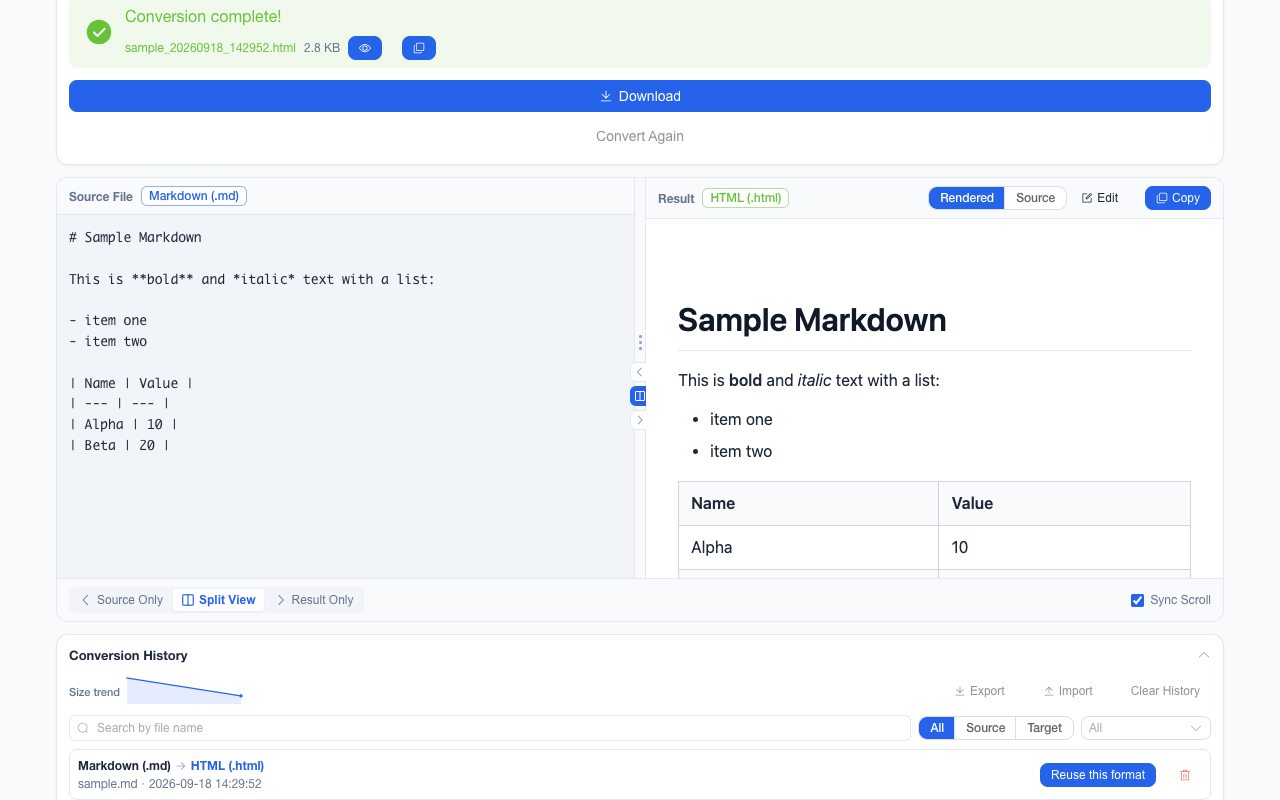
产物不是一段片段,而是从 <!DOCTYPE html> 起头、自带 <style> 的完整文档:系统字体栈、800 px 版心,标题、表格、代码块、引用都排好了样式,<title> 用你自己的文件名(去掉后缀)。渲染前有两道处理:先按 GFM 解析 Markdown,再交净化器过一遍——脚本与 on* 事件属性被移除,同时允许 html 与 svg 两组标签。后者是有原因的:Markdown 里内联的 SVG 图就是内容本身,只开 html 那一档曾把整张图吞掉。The output is not a fragment but a complete document starting at <!DOCTYPE html> with its own <style>: a system font stack, an 800 px measure, headings, tables, code blocks and quotes all styled, and a <title> taken from your own file name with the extension dropped. Two passes happen before rendering: Markdown is parsed in GFM mode, then the result goes through a sanitiser that removes scripts and on* event attributes while allowing both the HTML and SVG tag sets. The SVG part is deliberate — an inline SVG diagram inside Markdown is the content itself, and an HTML-only profile used to delete the entire graphic.
这条链路怎么走How the route runs
MarkdownMarkdown HTMLHTML
共 1 步,由扩展的路径搜索自动选出,中间产物不落盘。1 step, chosen by the extension's own path search; intermediate results never touch the disk.
会保留什么What carries over
- GitHub 风格扩展可用:表格、任务列表、删除线都按 GFM 解析GitHub-flavoured extensions work: tables, task lists and strikethrough all parse under GFM
- 单个换行不会变成 <br>:段落按空行划分,符合 CommonMark 的读法A single line break does not become <br> — paragraphs split on blank lines, the way CommonMark reads them
- 内联 SVG 图形被保留(净化同时允许 html 与 svg / svgFilters 两组标签),代码块、引用、表格按内联样式排好Inline SVG diagrams survive (the sanitiser allows the html and svg / svgFilters profiles together), and code blocks, quotes and tables arrive already styled
- 产物是完整可双击打开的文档:样式内联、无外部依赖,<title> 取你的文件名并且做了转义The result is a complete document you can double-click: styles inlined, no external dependency, and a <title> taken from your file name and escaped
- <script> 与 on* 事件属性在净化阶段被移除,输出的 HTML 不带可执行脚本<script> elements and on* handler attributes are removed during sanitisation, so the HTML carries no executable script
如实说明的限制What it does not do
- 外链图片只保留引用,转换过程不下载任何素材(这是离线前提);断网打开时那些位置就是空的A remote image stays a reference and nothing is fetched during conversion — that is the offline premise — so those spots are empty when you open the file offline
- Markdown 里没有的概念不会被造出来:目录、页眉页脚、脚注回链、代码语法高亮都不在输出里Concepts Markdown never carried are not invented: no table of contents, headers and footers, footnote back-links or syntax highlighting
- 版心是写死的 800 px 单栏样式,不随窗口变成多栏;想换就在编辑视图里改那个 <style>The measure is a fixed single 800 px column that will not reflow into columns; change it in the editing view, inside the one <style>
- <html> 上不声明 lang:内容语言是你的,扩展不替你猜(曾经写死英文,屏幕阅读器会把中文按英文规则念)The document declares no lang on <html>: the content language is yours and the extension will not guess — an English default used to make a screen reader pronounce Chinese text with English rules
实操提示Working with it
- HTML 属于可编辑文本格式,单文件批次转完可以在工作台的左右对照里直接改再下载HTML is an editable text format, so a single-file result can be changed in the workbench’s side-by-side view and then downloaded
- 这一条也是 Markdown → PDF 与 Markdown → Word 的第一步,多步链路由路径搜索自动给出This step is also the first hop of Markdown → PDF and Markdown → Word, where the multi-step route is found automatically
常见问题Questions people actually ask
为什么我写的换行没生效?Why did my line break not take effect?
解析按 CommonMark:单个换行只是源文本的折行。要么空一行分段,要么在行尾留两个空格强制换行。Parsing follows CommonMark, where a single newline is a soft break in the source. Leave a blank line to start a new paragraph, or end the line with two spaces to force a break.
能换成自己的 CSS 吗?Can I use my own CSS?
输出文档里只有一个内联 <style>。在工作台的编辑视图里替换或追加它即可;本项目不提供主题列表,因为样式跟着产物走,换机器也不会漂移。The document carries exactly one inline <style>. Replace or extend it in the editing view; there is no theme picker here, because the style travels with the artifact and cannot drift on another machine.
图片要怎么处理?What should I do about images?
三种办法:内联成 data URI(最稳,产物自带图)、用相对路径并把 HTML 放在能解析到这些路径的目录、或接受离线打开时图是空的。转换本身不会去下载任何东西。Three options: inline as a data URI (the most robust, the file then carries its own picture), use relative paths and open the HTML where they resolve, or accept that the gaps show offline. The conversion itself downloads nothing.
不需要账号,也不需要联网:装好扩展后点图标,在新标签页里打开工作台,文件从磁盘直接选。No account and no network: install the extension, click its icon, and the workbench opens in a new tab reading straight off your disk.
从 Chrome 应用商店安装Install from the Chrome Web Store 安装步骤Install steps GitHub 源码Source on GitHub