Why Autofill Fails: Seven Checks in Order
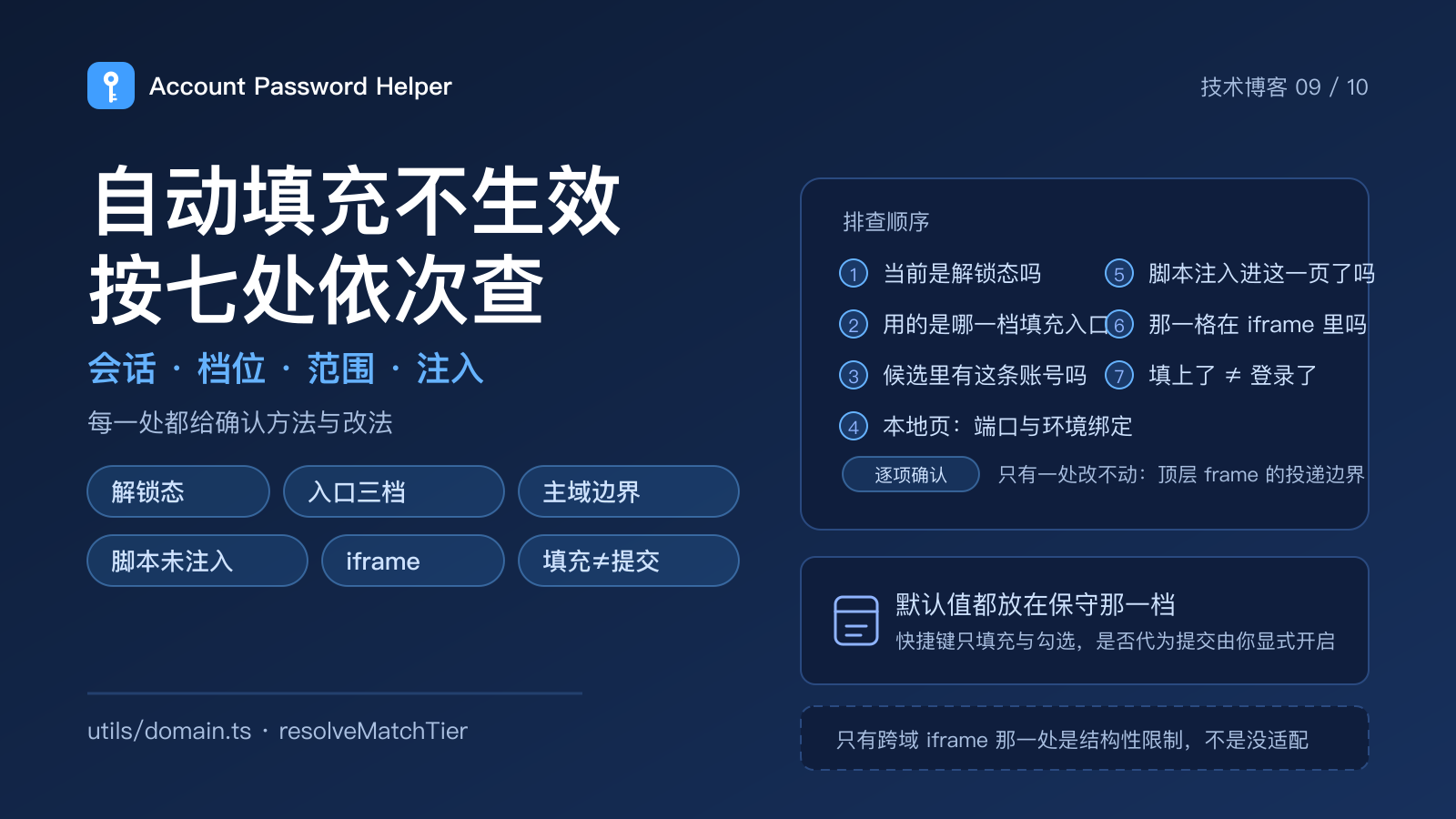
"Why didn't this site offer my account?" is the question I get most often in issues. My first instinct was always a matching bug. After reproducing enough failures to be embarrassed about it, the honest answer is different: most "autofill is broken" reports are not wrong matches — you happen to be standing outside one of seven doors, and each of them opens differently.
This post takes the pipeline apart into seven checks. For each one I'll say how to confirm it and where to change it, so you can work down the list instead of guessing.
1. Is the session actually unlocked
Passwords live in chrome.storage.local as per-field ciphertext, and the key comes from your master password through PBKDF2 (600,000 iterations). That means while locked, the extension simply has no plaintext to hand over.
So don't start with the site — start with the session. The toolbar icon switches from a padlock to a key once you're unlocked, and the side panel shows the remaining validity. If you just came back from a lock screen or the session expired, every entry point is grey. That isn't a defect, it's the price of this particular encryption design.
Related, and often mistaken for slowness: locking doesn't re-encrypt the vault. It discards the session key material and the decrypted snapshot. When unlocking feels slow, the cause is usually disk reads, not the number of entries.
2. Which fill entry are you on
This is the number one reason the docs and your screen disagree. There are three settings:
| Entry | What happens when a login field gets focus |
|---|---|
sidepanel |
The browser side panel opens on its own |
inline |
A key icon appears inside the field; clicking it opens an in-page dropdown |
manual |
Nothing automatic — you use the floating button or the toolbar icon |
Your default may not be the default in the docs. A fresh install starts on inline. People who upgraded from earlier versions get frozen to sidepanel, with "open the side panel automatically" kept on. The reason is how config is read: { ...defaults, ...stored }. If nothing is written for those keys, an upgrade would silently change long-time users' muscle memory. Preserving the old behaviour was the better trade.
One layer up: those three are global, but site rules can override the entry per domain. The same browser can legitimately show the side panel on github.com and the inline dropdown on an internal system. The settings panel states which rule covers the current site, so if an entry is missing on one site only, read that line before you go hunting for a global switch. Clearing the last override removes the rule outright rather than leaving you stuck unable to switch back.
3. Is the entry in the candidate list at all
If the panel opens but the account you want isn't there, you're looking at the matching tier.
The stored URL has to line up with the current hostname. The default tier off is exact-host matching: a page on mail.qq.com only surfaces entries stored against mail.qq.com, not one filed under qq.com. The three tiers are nested:
off— exact host only;wildcard— additionally includes entries you explicitly wrote as*.qq.com, so you decide the scope one entry at a time;sameMainDomain— additionally includes the apex entry and every other subdomain under the same main domain. The loosest.
Two boundaries explain most "why isn't this showing up" tickets:
evil-qq.comdoes not matchmail.qq.com, even atsameMainDomain. The main-domain test is deliberately not aendsWithon the hostname string — that shortcut is exactly what turnsevil-qq.cominto family.a.github.ioandb.github.ioaren't the same main domain either. Multi-tenant suffixes likegithub.ioare listed in a built-in deny table, and it's worth being precise about what that is: a deny table, not the full Public Suffix List. The complete PSL would mean shipping external data, and this module sits inside both the side panel's first paint and the content-script bundle, so the table only carries high-frequency, verifiable entries. A suffix that isn't in the table falls back to the old "last two labels" reading — which means an unlisted suffix can still be treated as same-main-domain. The cost of a missing entry is "same as before the table existed", not a safer default. That's a limitation worth remembering.
Put differently: what you typed in the entry's URL field decides the outcome more than whether the site "feels like" yours. If you really want a whole subdomain family to share, write *.qq.com and accept that it also drags fat and uat along.
4. Local dev pages: ports, and "which environment is this really"
localhost is the strangest slot: a loopback host has no meaningful main domain, so an extra port check runs on top, with three rules:
- the entry's URL carries a port → it only appears on the same port, so
localhost:3000andlocalhost:8080stay apart; - the entry's URL has no port → it's treated as port-agnostic and still shows up;
- the entry is written explicitly as
localhost:*→ it's allowed on every local port.
And when the current page itself has no port, this axis passes everything through. Isolating by port while leaving one port-agnostic escape hatch is the point: two projects shouldn't cross-fill, but nobody should have to register the same account twice either.
The more common trap: your frontend runs on localhost while its API points at dev.example.com. The page host is localhost, but the account you saved belongs to the remote environment. The extension lets a local page declare which environment it is really the frontend of, and then reuses the accounts already stored for that environment. The binding applies to that host and port only, and it's gone when the browser closes.
5. Did the content script land on this page
If pressing the hotkey gives you a "page not ready" style message, nothing was delivered. Before sending anything, the background worker pings the top frame; if it gets no answer it doesn't guess — it tells you, and the message is "refresh the tab".
That check exists because tabs opened before the extension was installed or updated have no content script in them. Chrome won't retroactively inject, so those tabs look dead until you reload them.
The subtler one: navigation can happen between picking the credential and delivering it. Delivery is therefore bound to that document, not to a frameId. Otherwise the same numeric frame could host a brand-new document by then, and your password would land in a page nobody intended to log into.
6. Is the field inside an iframe
Plenty of login forms sit in iframes — social sign-in, payment, SSO redirects. This is the item most easily stated wrong, so let me state the boundary precisely:
- Whether it can be filled depends on whether that frame shares a main domain with the top page. The background collects the fillable documents and then delivers to each of them in parallel. The fillable set is the top frame plus every frame whose URL is in the same main domain as the top (an
about:frame, which has no URL worth testing, walks up the parent chain to the first ancestor that does). So a login box embedded in your own subdomain's iframe is reachable; a cross-main-domain third-party iframe never receives credentials — that boundary is deliberate, not missing support. - The two in-page UIs (floating button and inline dropdown) live in a closed shadow root. Chosen for two reasons: the host page's CSS shouldn't leak in and ours shouldn't leak out; and after an
all: initialreset, theme tokens have to be written inline or skin switching stops following the theme.
So when an iframe gives you no entry point, first tell apart "same main domain" from "someone else's domain". For the second case, don't hope this path will reach it: handing plaintext to a document whose origin you can't confirm is the last thing a password manager should do.
7. "It filled" is not "it logged in" — and why no save prompt appeared
The last item is really two confusions wearing one coat.
Filling and submitting are separate. Ctrl+Shift+F fills and ticks the consent checkbox by default; it does not click the login button. Only "Fill and sign in" in the side panel chains all three. To make the hotkey submit too, you have to opt into "auto-submit login". The conservative default is intentional: auto-submit means one mis-timed keystroke can post a half-filled form, or sign you successfully into an environment you didn't mean to touch.
No save prompt usually means the field wasn't read as a password field. The predicate is a two-condition selector: input[type="password"], or any input carrying the data-aph-password marker the content script adds itself. A MutationObserver watches for fields inserted later and marks them, because many login pages render a shell first and insert the password input only after you focus it. Matching on type="password" alone misses that entire family of pages.
If the field is recognised and still nothing appears, check the three ceilings: the vault has a hard entry cap, the favourites limit evicts the least recently used entry once full, and each password keeps a configured number of history snapshots (3 by default). Those make the extension stop recording, not break.
The order to check in
| Symptom | Start at |
|---|---|
| Nothing works anywhere, entries are grey | 1 (locked session) |
| Other sites offer it, this one doesn't | 2 (fill entry / site-rule override) |
| Panel opens, the account isn't listed | 3 (matching tier and main-domain boundary) |
| Local dev page can't reach a remote environment's account | 4 (port isolation / environment binding) |
| "Page not ready" message | 5 (refresh the tab) |
| Only the login box inside a third-party iframe has no entry point | 6 (cross-domain boundary) |
| Form fills but stops there / no save prompt | 7 (submit and field detection) |
Only item 6 is something I deliberately won't "fix": the same-main-domain check and the document-bound recipient are two gates that exist on purpose — loosening either would hand plaintext to a document whose origin can't be confirmed. The other six all sit on switches you can flip yourself, which is why every default in this extension lives on the conservative side.
Source and discussion: the GitHub repository. It's listed on the Chrome Web Store, completely free, open source under GPL-3.0.
Key files referenced: utils/types.ts (FillMode / FillEntry and the unit site rules override), utils/storage/configManager.ts (fresh-install defaults and freezeLegacyFillDefaults), utils/domain.ts (resolveMatchTier, loopback and port isolation, public-suffix boundary), entrypoints/background/quickFillHandler.ts (PING probe and document-bound delivery), utils/frameFill.ts (which documents are fillable, the same-main-domain test, parallel per-document delivery), entrypoints/content/LoginAutoSave.ts (the data-aph-password two-condition predicate and MutationObserver), entrypoints/content/floatingButtons/ and entrypoints/content/inlineDropdown/ (closed shadow DOM).