Managing Dev, Test and Prod Accounts Safely
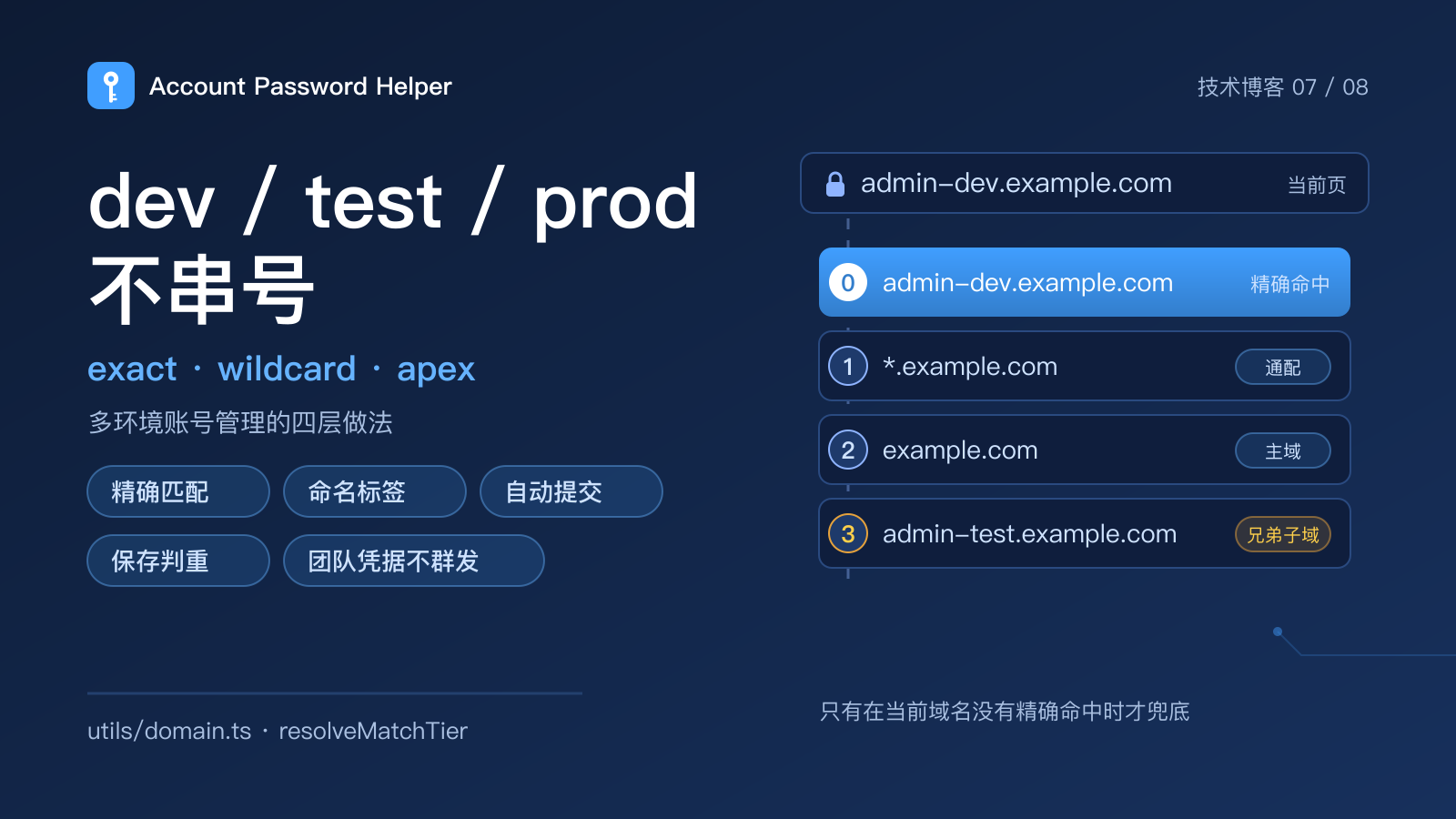
One admin system, four accounts: dev, test, staging and prod. The hosts are admin-dev.example.com, admin-test.example.com, admin-staging.example.com and admin.example.com. They look easy to tell apart. The problem at login time is usually not remembering the password — it is which account the password manager hands you.
Filling the wrong environment can be merely annoying, or it can let a test account mutate production data. This guide covers four layers: matching rules, naming, auto-save and team handoff.
Why wrong-environment fills are not a rare edge case
Most password managers match at the site level: the same registrable domain counts as the same site. That is a reasonable simplification for consumers and a risk for developers:
dev.example.comandexample.commay be treated as one site;- several admin panels under one domain share a login page, so the list fills with similar accounts;
- autofill may pick the most recently used or top-sorted entry, not the current environment;
- with auto-submit enabled, the wrong credentials can be sent immediately.
The goal of multi-environment management is therefore not "remember more passwords". It is to make the wrong fill less likely through matching, naming and explicit actions.
Layer 1: let matching rules block the wrong account
Host matching is the strongest layer. Think of it as three tiers:
- Exact host (default): only entries whose normalized host matches exactly are shown. An
admin-dev.example.comentry never appears onadmin.example.com. This is the baseline for environment isolation. - Exact + wildcard entries: entries saved as
*.example.combecome available on every subdomain. Use it when one test account genuinely serves the whole subdomain family, and decide entry by entry. - Same apex domain: when the current host has no account, offer the apex and sibling subdomains, clearly badged as cross-subdomain. This is a fallback, not the default.
Treat localhost and 127.0.0.1 separately: local projects often run on different ports, so localhost:3000 and localhost:5173 should stay apart. When the page has no port, showing all local entries is a useful development convenience.
Account Password Helper exposes these three tiers in the manager header and badges widened results. For the implementation and the edge cases, read Three tiers of cross-subdomain matching.
Layer 2: put the environment into names and tags
Matching decides which accounts appear; naming and tags help you pick the right one once they do:
- Put the environment in the username where possible, e.g.
qa+staging@example.comordeploy-prod@example.com; - Use stable tags such as
prod,staging,qaandci, not ad-hoc labels; - Reserve favorites for accounts you use daily, so multi-environment entries do not crowd the top;
- Use remarks to state what the account can and cannot do: "read-only", "can deploy", "test only".
Tags and names are not decoration. They are the cues you use to make a fast, correct decision in a long list of similar entries.
Layer 3: treat auto-submit as a dangerous action
Autofill and auto-submit are different. Filling writes values into the form; auto-submit sends the login request.
Recommendations:
- Disable auto-submit in production by default, and click login deliberately when needed;
- Enable it for test environments where repeated regression logins are common;
- For admin panels involving money, permission changes or irreversible operations, confirm the environment even when auto-submit is on;
- Treat "fill and sign in" as an explicit action, not something that happens automatically after page load.
This is not a tool limitation; it is an operating boundary. The closer you are to production, the more the final action should stay with a human.
Layer 4: make saving and overwriting predictable
Auto-save can create mess in multi-environment setups:
- When the same host and username get a new password, prompt to update instead of silently overwriting;
- A different username should create a new entry, not merge because the URL matches;
- Dedupe rules should not change with the matching tier. Widening the visible set is for convenience; it does not mean different environments are the same entry;
- Review duplicates periodically, but never let a bulk dedupe delete accounts from different environments.
Account Password Helper deliberately keeps save-time dedupe separate from display matching: widening the tier changes which accounts are visible and fillable, not how "same host + same username" is judged on save.
Team handoff: share the tool, not the credentials
Multi-environment accounts often involve a team, but never send passwords through chat, documents or screenshots. Safer patterns:
- Give each person their own account with role-based access instead of sharing one production login;
- For credentials that must be shared, use a team password manager or enterprise secret manager with auditing;
- A local-first tool is for personal management; it does not provide team sync and should not be used as a shared drive;
- Hand over ownership and permissions, not a plaintext password in a chat history.
If you only want to recommend a tool to a colleague, share the product page — not your own vault.
Pre-release checklist
- The matching tier fits the project: exact by default, widened only entry by entry;
-
localhost/127.0.0.1stay per-port; - Auto-submit is off for production;
- Names and tags make the environment obvious at a glance;
- Update/add prompts during auto-save are reviewed;
- Team sharing goes through an approved channel, not a group chat;
- The latest encrypted backup is usable.
The goal is not the slogan "never fill the wrong account". It is to make every fill explainable: why this account appeared, why this environment cannot cross over, and why the final submit action is yours to confirm.
To try how the three tiers change the candidate list, open the multi-environment demo. If you manage several environments every day, try Account Password Helper.