Web Crypto for a Real Password Manager

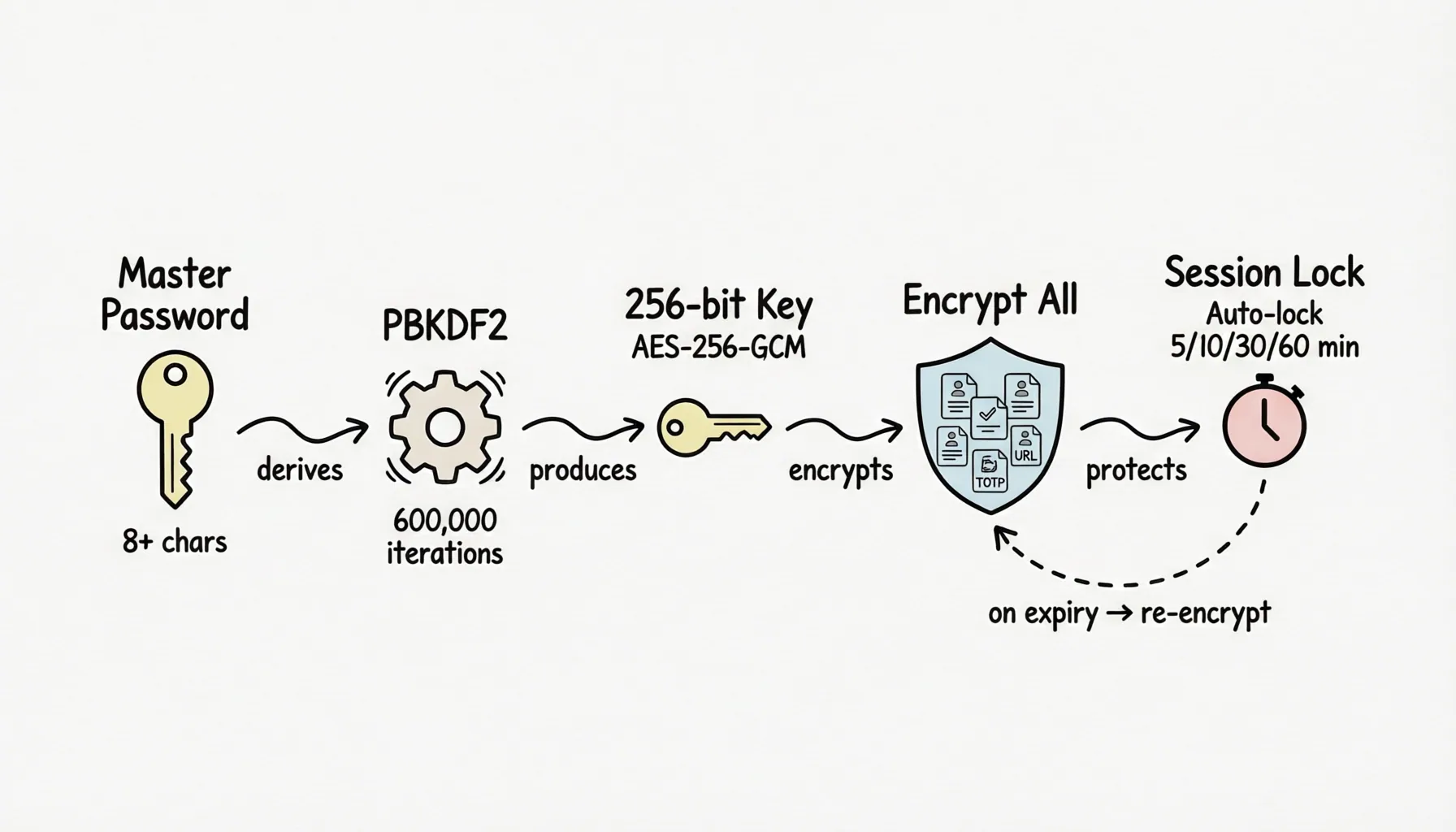
When building the encryption module for a password manager, the instinct is to pull in a crypto library. But if you're building a browser extension, there's a better option: import nothing, and build directly on the browser-native Web Crypto API.
Account Password Helper is a zero-cloud, local-first password manager extension. Its encryption module (utils/encryption.ts) is built entirely on Web Crypto — not a single line of third-party crypto code. This post breaks down the full design: why these choices, how each parameter was set, and the edge cases that are easy to miss.
Why Web Crypto Instead of a Library
Three reasons, in order of importance:
- Auditability. A password manager's trust foundation is "users can verify you're not doing anything shady." Depending on a thousands-of-lines third-party crypto library immediately widens the audit surface.
crypto.subtleis implemented by the browser engine itself — stable interfaces, public behavior — and the crypto logic in your source stays small enough to count on one hand. - Attack surface. Supply-chain poisoning is a real threat in the extension ecosystem. One fewer npm dependency is one fewer entry point for a poisoned package.
- Performance. For heavy-iteration workloads like PBKDF2, native implementations are an order of magnitude faster than JavaScript ones.
The cost is a low-level, fully async API with terse error messages — which is exactly the kind of constraint that forces you to think through every step.
Key Derivation: PBKDF2-SHA256, 600,000 Iterations
The user's master password can't be used directly as an encryption key: it lacks entropy, and it needs salting against rainbow tables. The standard answer is a key derivation function. We chose PBKDF2-SHA256 with 600,000 iterations — the value the OWASP Password Storage Cheat Sheet has recommended for PBKDF2-SHA256 since 2023, calibrated to make each brute-force attempt expensive enough.
Two design points:
Random salt, stored in plaintext alongside the data. Each installation generates its own 16-byte random salt (32 hex characters), kept in plaintext in the master-password config — same storage area as the ciphertext, different key. The salt isn't secret — its job is to ensure "the same master password derives different keys on different installations," defeating precomputed attacks.
Domain separation for the verification hash. To check "is this master password correct," we don't attempt a trial decryption of real data (decryption failures are ambiguous — wrong password vs. corrupted data). Instead, the master password goes through a prefixed verification hash. The prefix aph-verify| provides domain separation: the input spaces for verification and encryption never overlap, ruling out cross-purpose abuse like feeding a verification value off as ciphertext or grinding captured ciphertext against the verifier.
Data Encryption: Field-Level, AES-256-GCM
Rather than encrypting the vault as one blob, we encrypt per field: each entry's username, password, URL, notes, and TOTP secret are encrypted individually. The payoff is practical — the list view renders titles, icons, and tags without ever decrypting sensitive fields; side panel search and rendering touch metadata only.
The algorithm is AES-256-GCM:
- GCM is an authenticated mode — tampered ciphertext fails decryption outright, so integrity checking is built in, no separate HMAC layer needed;
- Every encryption uses a fresh random 12-byte IV, stored as
Base64(IV || ciphertext || authTag)— the 16-byte GCM authentication tag is written out with the ciphertext. IV and ciphertext travel together; there is no path to IV reuse; - IVs come from
crypto.getRandomValues— never counters or predictable sources. Under GCM, IV reuse is catastrophic, and this point admits no compromise.
CryptoKey handles are cached under a tiny map (keyed by "usage + hex key", capacity 4, FIFO eviction), which takes the O(entries × fields) importKey calls in batch encryption down to O(1) — note it caches imported handles only; the PBKDF2 derivation itself is never cached. Handles are imported with extractable: false, so raw key bytes can't be exported, and locking the session clears the cache immediately — no key material left in memory to be recovered by anything other than GC.
Sessions: How Long Does a Key Live in Memory?
Get the encryption right but fumble key management, and you've accomplished nothing. The session layer:
- Configurable lifetime: 24 hours by default, selectable from 1 hour to 7 days. Expiry rewrites no ciphertext — data on disk was always ciphertext anyway. What expires is the session data key and the decrypted snapshot, after which nothing can be decrypted until the master password is verified again.
- Idle lock: opt-in and off by default; once enabled,
chrome.idletriggers an immediate lock on system screen lock, and locks when idle passes the threshold. - Relock on browser restart: also opt-in and off by default; once enabled, enforced at
onStartupfor shared-device scenarios. - Manual lock: one click in the popup; locking synchronously wipes in-memory key handles and decrypted snapshots.
Every lock path must funnel through the same cleanup function. This is the line code review watches hardest, because a single missed path turns "lock" into theater.
Re-Keying: Atomic Master-Password Changes
"Change master password" is the feature encryption systems most often get wrong: everything must be re-encrypted with the new key — what happens if it fails halfway?
The implementation decrypts and verifies everything first — entries, recycle bin, password history — then derives the new data key keeping the same salt and the same iteration count (deriveEncryptionKey reads that salt back out of storage; swapping it would derive a different key on every later decrypt and make the vault permanently undecryptable, while changing the password already supplies the security a new salt would add). Only after re-encrypting all three data sets does it commit, writing the new ciphertexts, the new verification hash and the new session key material in a single chrome.storage.local.set(). Any step failing rolls the whole operation back, leaving old data intact. The one unforgivable sin of a password manager — "you changed the password and now nothing decrypts" — is structurally impossible. Tests cover success, mid-flight failure, and legacy-format compatibility.
Treat Every Input as Hostile
Extensions run in hostile environments. Page DOM, imported CSV files, runtime messages, legacy data in storage — all treated as untrusted input, validated at the boundary for type, length, and shape, failing safe. The rendering layer never passes external or user-derived strings through v-html/innerHTML. None of this produces features. It's the muscle memory a password manager is supposed to have.
Two recent cases make that concrete. The first is the weak / reused password hint in the auto-save prompt: it's a derived conclusion computed over the already-decrypted vault, so it is deliberately kept out of both the pending record and sessionStorage (otherwise a user changing the password would leave a stale reuse count behind), and the cross-navigation recovery path recomputes a fresh one. When the prompt is delegated into an iframe, the hint crosses the frame boundary via postMessage and is narrowed field by field on arrival — weak only accepts the strict boolean true, reusedCount only accepts an integer in 1..9999, anything else is dropped. The second is the URL field in the read-only detail drawer: a stored URL is user-editable, hence untrusted, so it goes through toNavigableUrl first (adds the default protocol, uses http for local dev domains, explicitly rejects non-navigational schemes like javascript: / data:) before it may appear in an href — a null result simply renders no link.
Why We Moved from MIT to GPL-3.0
At v3.0 the project switched licenses from MIT to GPL-3.0 — deliberately. A password manager's value is "auditable + trustworthy," and GPL ensures that anyone building derivatives must release them under equally open terms. The supply chain of a security tool should have no closed-source forks. Previously published versions remain under MIT; GPL applies from the switch forward.
An Honest Disclaimer
The other side of security is knowing your limits:
- This tool is positioned for development, testing, and everyday logins. Do not store banking or payment credentials in any browser extension.
- A forgotten master password cannot be recovered by default. Enable encrypted backups (.aph files) and enroll an offline recovery key as a second way back.
- The entire encryption implementation is open source. Audits and issues welcome — for a password manager, being read line by line isn't an intrusion; it's the source of trust.
Source and discussion: the GitHub repository. If you're building local-first security tools too, share the traps you've hit in the comments.
Key files referenced: utils/encryption.ts (crypto core), utils/sessionManager.ts (session management), tests/ (4654 automated tests, including encryption and re-key paths).